

LabelPeel
Print labels from Excel & Google Sheets, without the mail merge.
Scheduled for launch week · Feb 1 – Feb 7
This page is live now, but homepage visibility starts that week after admin approval. The website link stays nofollow until launch week begins, then switches to dofollow.
About LabelPeel
LabelPeel is a browser tool for printing labels straight from a spreadsheet. Copy your rows from Excel, Google Sheets or Numbers, or drop in an .xlsx or CSV file, and every row becomes a label. Pick your sheet by typing the code on the pack: Avery-compatible 5160, L7160 and more than 80 others, in US Letter and A4, plus custom sizes.
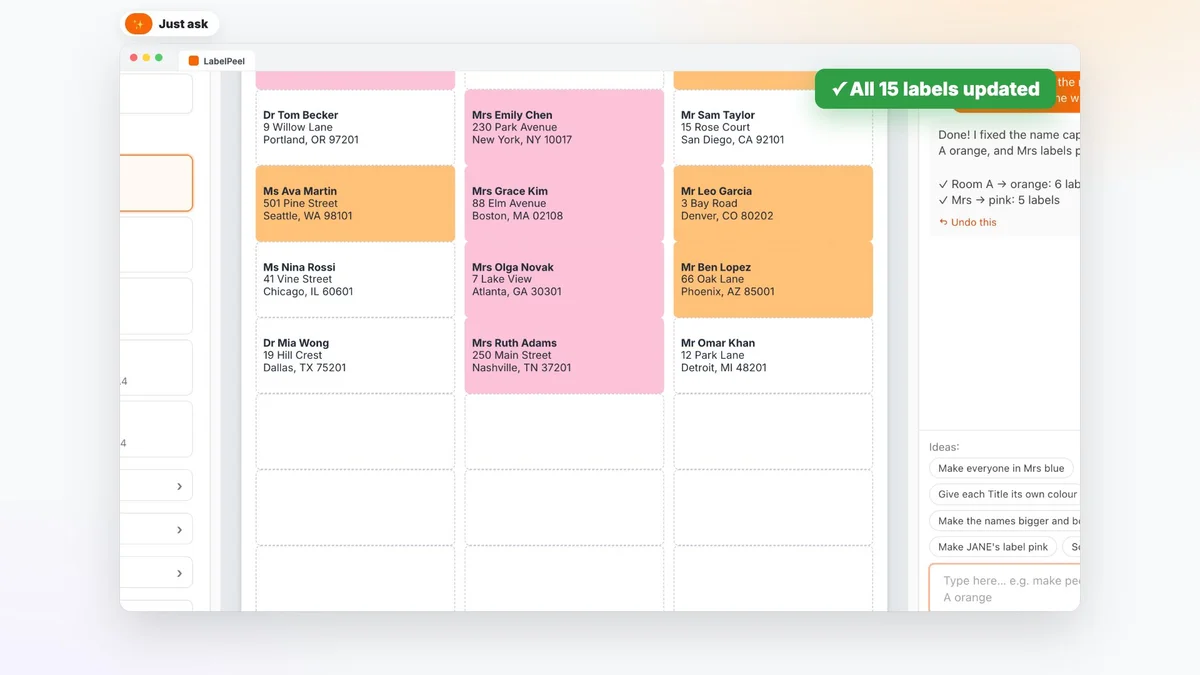
You can restyle labels in plain English. Type "make Room A orange" and only the matching labels change. Click any label to fix a typo, turn a column into a barcode or QR code, add a logo, or start on a half-used sheet. A plain-paper test page helps line up your printer.
When you're done, print at actual size or download a PDF. Labels stay saved in your account for next time. There's no Word mail merge and nothing to install, and it's free while in beta, no card needed.
LabelPeel launched on Founder.best on Feb 1, 2027 by LabelPeel and is listed under Productivity.
- Pricing
- Free
- Platform
- Web
- Launched
- Category
- Productivity
Reviews
No reviews yet. Be the first to rate this product!
Comments
to leave a review or comment
No comments yet. Start the conversation!