
Startup tools
Growth Navigate Startup Tools: The Complete Guide for Startups in 2026
You don't need forty subscriptions to grow. You need the right five, picked for the stage you're actually in, wired together so every signup and every dollar shows up in one place. Here's how to choose them.

Post by Anuj Shashimal
Founder, Founder.best19 min read
Growth navigate startup tools are the apps you use to find customers, figure out what they want, and keep them paying. Pick the right ones and a two-person team can run marketing, sales, analytics and support without hiring for any of it. Pick the wrong ones and you'll spend Friday afternoons reconciling five dashboards that disagree with each other.
This guide sorts the tools by the problem you're trying to solve. It compares the big names with current pricing, and tells you what to use at each stage, so you can skip the stuff you don't need yet.
1. Introduction to Growth Navigate Startup Tools
A startup growth tool is any piece of software that helps you get from "someone might want this" to "people pay for this every month." That covers a lot of ground:
- Marketing tools bring strangers to your site.
- Sales tools help you follow up with the ones who showed interest.
- Product analytics shows you what people actually do after they sign up.
- Retention tools keep them around long enough to pay twice.
Why bother with tools at all? Because memory doesn't scale. When you have three users, you know all of them by name. At 300, you can't remember who asked for the CSV export, who churned last week, or which blog post brought in your best customer. Good tools hold that context for you.
The catch is that tools don't create growth. They measure it, speed it up, and remove friction. A great CRM won't help if nobody is in the pipeline. Think of your stack as a car dashboard: really useful, but it won't drive the car for you.
2. What Does Growth Navigate Mean for a Startup?
Navigating growth means making the next decision with better information than you had last week. It's less about speed and more about direction.
In practice, it comes down to four habits.
Set one clear goal at a time
"Grow" isn't a goal. "Get 20 paying customers by December" is. A clear goal tells you which tool matters this month. If the goal is paying customers, your payment and conversion data matter more than your Twitter follower count.
Talk to customers before you buy software
Customer research is free and still beats most paid tools. Five 20-minute calls will tell you more about why people sign up (or don't) than a month of heatmaps. Write down the exact words they use. Those words become your landing page copy and your SEO keywords.
Make decisions from data, not hunches
Here's a simple example. You notice 60% of trial users never connect their first integration. That's a clear signal: fix onboarding before you spend another dollar on ads. You only see that kind of insight if you track events, which is where analytics tools come in.
Build repeatable processes
If you've sent the same "how's it going?" email to new users ten times, it's a process. Write it down in Notion. Once it's stable, automate it. Repeatable work is where tools save real time. One-off work rarely needs software.
3. Best Growth Navigate Startup Tools by Category
Instead of a giant alphabetical list, here's how the categories map to the problems you'll actually face.
Marketing and customer acquisition
The problem: nobody knows you exist.
You need a way to reach people, capture their email, and follow up. Early on that usually means email marketing, a landing page builder, and a presence in the communities where your buyers hang out.
- HubSpot Free covers forms, basic email and a CRM in one place.
- Newsletter tools like Beehiiv or Loops work well if content is your main channel.
- Launch platforms and directories give you discovery without ad spend.
For a wider list, see our marketing tools for startups breakdown.
SEO and organic traffic
The problem: you want traffic that keeps coming without paying for every click.
SEO tools help you find what people search for, see what competitors rank for, and check your site for technical issues. Google Search Console is free and should be your first install. Semrush or Ahrefs come later, once you're publishing regularly.
SEO is slow. Expect three to six months before a new domain sees steady traffic. That's why backlinks from established sites matter so much early on. Our SEO for startups guide covers the full playbook.
Sales and CRM
The problem: leads slip through the cracks.
A CRM tracks every conversation, deal and follow-up date. If you sell to businesses, you need one the moment you have more than about 15 active conversations. Before that, a spreadsheet works fine.
Compare options in our guide to the best CRM for startups.
Product analytics
The problem: you don't know what users do after signup.
Web analytics (Google Analytics) tells you where visitors came from. Product analytics (PostHog, Mixpanel, Amplitude) tells you what they did inside your app. For a SaaS product, the second one usually matters more.
AI and productivity
The problem: there are too many tasks and not enough hours.
AI assistants draft emails, summarize calls, write first-pass docs and help you research competitors. Notion, with its built-in AI, doubles as your company wiki, roadmap and meeting notes. Use AI for first drafts and grunt work, and keep your own judgment on anything a customer sees.
Workflow automation
The problem: you keep copying data between apps by hand.
Zapier, Make and n8n connect your tools. A new Stripe customer can trigger a welcome email, a CRM record and a Slack ping at the same moment. Just don't automate a process you haven't done by hand at least a few times.
Customer support and retention
The problem: users get stuck, go quiet and cancel.
A shared inbox or live chat widget (Crisp, Intercom, HubSpot's free chat) gives users a fast way to reach you. Pair it with in-app surveys and behavior-based emails. Getting a churned user back is expensive. A quick reply on day two is cheap.
Payments and revenue management
The problem: you need to collect money and understand it.
Stripe handles one-time payments, subscriptions, invoices and tax. Revenue dashboards (Stripe's own reports, or tools like Baremetrics and ChartMogul) show MRR, churn and expansion. Once you have paying customers, this is the most honest number you'll have.
4. Essential Startup Growth Tools to Consider in 2026
These seven come up in almost every startup stack. Here's how they compare. Pricing was checked against each vendor's public pricing page in October 2026, but vendors change plans often, so confirm before you commit.
| Tool | Main job | Best for | Starting price |
|---|---|---|---|
| HubSpot | CRM, email, forms | B2B teams with a sales motion | Free; Starter from $15/seat/mo (annual) |
| Semrush | SEO and AI search research | Teams publishing content weekly | Limited free; paid from $139/mo |
| PostHog | Product analytics, session replay | SaaS and app builders | Free up to 1M events/mo |
| Zapier | Workflow automation | Non-technical founders | Free 100 tasks/mo; Pro from $19.99/mo (annual) |
| Notion | Docs, wiki, planning | Every early team | Free; Plus $10/member/mo |
| Stripe | Payments and billing | Anyone charging online | No monthly fee; 2.9% + 30¢ per US card charge |
| Google Analytics | Web traffic analytics | Content and marketing sites | Free (GA4 standard) |
HubSpot
- Main purpose: CRM with marketing, sales and support tools built on top.
- Ideal user: B2B founders who run demos, send proposals or manage a pipeline.
- Pricing model: free tools for up to two users, then per-seat Starter plans. The Starter Customer Platform starts at $15 per seat per month billed annually, or $20 billed monthly, and HubSpot regularly runs lower promo prices for new customers. Marketing Hub Professional jumps to about $800 a month with three seats, plus a one-time onboarding fee.
- Limitations: the jump from Starter to Professional is steep, and marketing contacts are priced in tiers, so your bill grows with your list. It's easy to pay for features you'll never configure.
My take: start on HubSpot Free. Upgrade only when you're hitting real limits, like needing automated sequences for a sales team.
Semrush
- Main purpose: keyword research, competitor analysis, rank tracking, site audits and now AI search visibility tracking.
- Ideal user: founders who've committed to SEO and publish at least weekly.
- Pricing model: a free account with 10 reports a day. The SEO plan is $139 a month ($117.33/mo billed yearly). Starter, which adds AI search tracking, is $199. Pro+ is $299. Advanced moved to quote-only in October 2026. Each plan includes one user, and extra seats cost more.
- Limitations: it's expensive for a pre-revenue team, and the data doesn't help if you aren't publishing.
My take: use the free account and Google Search Console until you're shipping content every week. Then buy a month, do all your keyword research, and decide if you need it ongoing.
PostHog
- Main purpose: product analytics, session replay, feature flags, A/B tests, surveys and error tracking in one tool.
- Ideal user: SaaS and app founders who want to see what users do inside the product.
- Pricing model: usage-based, with a free allowance that resets every month (1M analytics events, 5,000 session recordings, 1M feature flag requests, 100K exceptions, 1,500 survey responses). Past that, you pay per unit, and you can set billing caps per product.
- Limitations: you need to plan your events up front to get useful funnels. The free plan is limited to one project and one-year data retention. And it's more product-focused than marketing-focused, so ad attribution isn't its strength.
My take: for most SaaS startups, this is the best value in the whole stack.
Zapier
- Main purpose: connecting apps so data moves without manual copying.
- Ideal user: non-technical founders who want automation without writing code.
- Pricing model: priced by tasks. Free gives you 100 tasks a month and two-step Zaps. Professional starts at $19.99 a month billed annually ($29.99 monthly) for 750 tasks. Team starts at $69 a month billed annually for 2,000 tasks.
- Limitations: costs climb fast as volume grows, and AI steps can use more than one task each. A busy workflow can quietly burn through your plan.
My take: perfect for your first five automations. If you're technical and running thousands of tasks, look at Make or self-hosted n8n.
Notion
- Main purpose: docs, wikis, project boards, meeting notes and lightweight databases.
- Ideal user: every early team, especially remote ones.
- Pricing model: per member. Free for individuals, Plus at $10 per member per month, Business at $20 (which adds Notion Agent and AI meeting notes), and custom Enterprise pricing. Check monthly vs annual billing at checkout.
- Limitations: the free plan limits blocks once you add teammates, file uploads cap at 5 MB, and it's not a real CRM or analytics tool, even if templates claim otherwise.
My take: use it as your company's operating manual. Keep customer data in your CRM, not in a Notion table.
Stripe
- Main purpose: accepting payments, running subscriptions, sending invoices and handling tax.
- Ideal user: anyone charging money online, from one-off digital products to usage-based SaaS.
- Pricing model: pay-as-you-go. US domestic cards cost 2.9% + 30¢ per successful charge, with extra fees for international cards and currency conversion. Stripe Billing and Stripe Tax add their own fees on top.
- Limitations: fees add up at volume. Disputes cost extra. And if you sell globally, you'll need to handle sales tax and VAT, either through Stripe Tax or a merchant of record like Paddle or Lemon Squeezy.
My take: the default for good reason. Turn on Smart Retries early, because failed card payments are a sneaky source of churn.
Google Analytics
- Main purpose: tracking website traffic, sources, campaigns and conversions.
- Ideal user: content sites, marketing sites, and anyone running Google Ads.
- Pricing model: GA4 standard is free. The enterprise version, Analytics 360, is quote-based and widely reported to start around $50,000 a year.
- Limitations: data retention tops out at 14 months on the free version, reports can be sampled at high volume, and the interface has a steep learning curve. You'll likely need a cookie consent setup in the EU and UK.
My take: install it for marketing attribution, especially if you run Google Ads. For in-product behavior, pair it with PostHog. Privacy-first options like Plausible are simpler if you only need traffic stats.
Approximate monthly cost for a 2-person team using paid entry tiers
- Semrush SEO$139
- Notion Business$40
- HubSpot Starter$30
- Zapier Pro$20
- Notion Plus$20
- PostHog$0
- Google Analytics$0
5. How to Choose Startup Tools Based on Your Growth Stage
The most common mistake is buying for the company you hope to be in two years. Buy for the company you are this quarter.
Idea and validation stage
You're trying to answer one question: does anyone care?
- Notion for interview notes and problem hypotheses
- A simple landing page (Carrd, Framer or Webflow) with an email signup
- Google Forms or Tally for surveys
- Reddit, LinkedIn and niche forums for finding people to talk to
Budget: close to $0. If you're paying for a CRM at this stage, stop.
Example: say you're building a scheduling tool for dog groomers. Before writing code, you message 30 groomers in a Facebook group and book eight calls. Notion holds your notes. A one-page site collects 40 emails. Total cost so far: a domain name.
Pre-launch stage
You're building and lining up your first users.
- Google Analytics or PostHog installed before launch, not after
- An email tool to warm up your waitlist (Loops, Beehiiv or HubSpot Free)
- Stripe set up with test payments working
- A launch plan for where you'll announce
Our SaaS launch checklist covers the steps in order, and our Product Hunt launch strategies guide helps you plan launch day.
Early customer acquisition
You've launched, and now you need people who stick around.
- PostHog funnels to find where signups drop off
- HubSpot Free or a spreadsheet CRM for follow-ups
- A shared support inbox or chat widget
- Two or three acquisition channels you can test cheaply
This is where focus pays off. Our guide on how to get your first 100 users has channel-by-channel tactics.
Product-market fit
Retention curves are flattening, and people are telling their friends.
- Zapier to automate the handoffs you've been doing by hand
- Semrush once content is a proven channel
- Lifecycle email triggered by product events
- Revenue dashboards for MRR, churn and expansion
Scaling and revenue growth
You have a repeatable engine and you're hiring.
- HubSpot paid tiers or another full CRM for a growing sales team
- Notion Business for team docs, permissions and AI meeting notes
- Paid analytics features like longer retention and more projects
- Dedicated support software with help center articles and SLAs
Rough monthly tool budget by stage (bootstrapped SaaS)
- $0-20
- Idea and validation
- $20-60
- Pre-launch
- $50-150
- Early acquisition
- $150-500
- Product-market fit
- $500+
- Scaling
6. Free Growth Navigate Startup Tools for Bootstrapped Founders
You can run a serious startup on free plans for a long time. The trick is picking free tiers that are generous enough to grow into, not ones designed to push you into an upgrade after a week.
Here's a lean stack that costs nothing except payment fees:
- Analytics: Google Analytics 4 (traffic) and PostHog Free (product behavior)
- SEO: Google Search Console, Bing Webmaster Tools and the Semrush free account
- CRM: HubSpot Free, or a well-organized Google Sheet
- Email: HubSpot Free email, or the free tier of a newsletter tool
- Automation: Zapier Free for up to 100 tasks a month
- Docs and planning: Notion Free
- Payments: Stripe (no monthly fee)
- Support: Crisp's free chat widget, or a shared Gmail inbox
- Discovery: free launch slots on Founder.best and other directories
Open-source options worth knowing
If you're comfortable self-hosting, open-source tools cut costs even more:
- PostHog (MIT-licensed version) for analytics
- Plausible or Umami for privacy-friendly traffic stats
- n8n for automation with no task-based pricing
- Chatwoot for customer support
- Cal.com for scheduling demos
The real cost of self-hosting is your time. If you spend four hours a month maintaining servers, that's four hours you didn't spend talking to customers. Self-host when it saves real money, not just to avoid a $10 bill.
Low-cost upgrades that pay for themselves
When you do pay, put money where it directly touches revenue:
- A custom email domain, so your outreach doesn't land in spam
- Zapier Pro once manual data entry eats an hour a week
- A one-month Semrush plan for a focused keyword research sprint
- A paid launch on a directory that gives you a dofollow backlink and real traffic
7. How to Build a Startup Growth Stack That Works Together
A pile of tools isn't a stack. A stack is a set of tools that share data, so you can follow a customer from first visit to renewal.
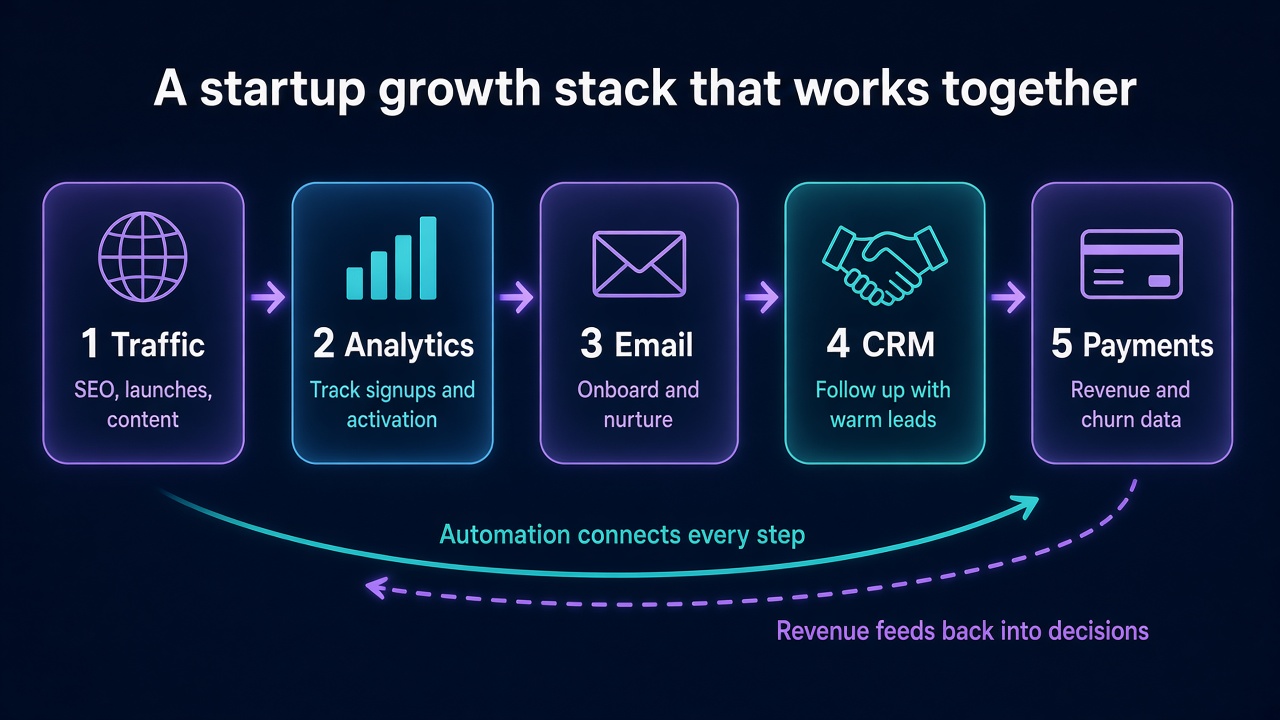 A startup growth stack that works together: traffic, analytics, email, CRM and payments connected by automation
Here's how the pieces connect:
- Traffic arrives from SEO, launches, content and communities. Tag every link with UTM parameters, so you know the source.
- Analytics records the visit, the signup and key in-app actions. Use the same user ID in Google Analytics, PostHog and your app.
- Email takes over after signup with onboarding messages, triggered by what users did or didn't do.
- The CRM gets a record for every lead worth a personal follow-up, including the source and the actions they took.
- Payments close the loop. When Stripe records a charge, that revenue gets tied back to the original source.
Automation is the glue. A Zapier workflow can watch for new Stripe customers, update the CRM, tag them in your email tool and ping your Slack.
A real-world example
Say you run a small SaaS that turns podcast episodes into blog posts. Here's how one customer moves through a connected stack:
- She finds your product page through a startup directory listing.
- Google Analytics logs the referral source. PostHog tracks her signup and first upload.
- She uploads one episode but never publishes the result. A PostHog cohort triggers an email on day two with a two-minute video on publishing.
- She publishes, upgrades through Stripe Checkout, and Zapier creates a HubSpot deal tagged with the directory as the source.
A month later, you look at your data and see that directory visitors convert to paid at twice the rate of your Twitter traffic. That's a decision you can act on. Without connected tools, you'd never know.
Keep the stack small enough to understand
Every new tool adds a place where data can get stuck. Before adding one, ask:
- Does it connect to my analytics and CRM?
- Will it replace something, or just add another login?
- Can I explain in one sentence what it does for revenue?
8. Common Startup Growth Tool Mistakes to Avoid
Most stack problems aren't caused by bad tools. They come from good tools used at the wrong time.
Tool overload
You signed up for 14 free trials during launch week. Now you have three analytics tools, two email platforms and nobody knows which numbers are right. Pick one tool per job and delete the rest.
Unnecessary subscriptions
Audit your card statement every quarter. Founders regularly find $200 to $400 a month in tools nobody has opened since spring. Cancel anything you haven't used in 30 days.
Disconnected data
If your signups live in one tool, your revenue in another, and your support tickets in a third, and none of them share an ID, you can't answer basic questions. Which channel brings customers who stay? Which feature do paying users touch first? Set up shared user IDs early. It's tedious, and it's worth it.
Premature automation
Automating a broken process just breaks it faster. If your onboarding email gets a 2% click rate when sent by hand, automating it won't fix it. Write it, send it manually, improve it, and then automate.
Measuring vanity metrics
Page views, followers and total signups feel good, but they don't pay rent. Track the numbers that predict revenue:
- Visitor-to-signup conversion rate
- Signup-to-activation rate
- Trial-to-paid conversion
- Month-two retention
- Revenue by acquisition channel
Which metrics predict revenue for early SaaS (relative usefulness)
- Trial-to-paid conversion95
- Month-two retention90
- Signup-to-activation85
- Revenue by channel80
- Total signups35
- Page views20
- Social followers10
9. Frequently Asked Questions About Growth Navigate Startup Tools
What are growth navigate startup tools?
They're the software a startup uses to steer growth: finding customers, tracking what they do, following up, automating repetitive work, supporting users and collecting revenue. The "navigate" part matters. Good tools help you decide what to do next, not just show you more charts.
What are the best startup growth tools in 2026?
It depends on your stage, but a strong default stack is PostHog or Google Analytics for analytics, HubSpot for CRM, Zapier for automation, Notion for docs, Stripe for payments, and Semrush once SEO becomes a real channel. Add launch platforms and directories for discovery.
Which startup growth tools are free?
Google Analytics 4 is free. PostHog gives you 1M events and 5,000 session recordings free every month. HubSpot has a free CRM, Zapier Free includes 100 tasks a month, Notion has a free plan, and Stripe charges no monthly fee. Semrush has a limited free account, and Founder.best offers free weekly launch slots.
How can startups find customers with limited budgets?
Go where your buyers already talk: niche communities, subreddits, Slack groups and industry forums. Reach out personally to your first 20 to 50 prospects. Publish one genuinely useful piece of content a week. List your product on launch platforms with permanent pages. Then track which channel brings users who activate, and do more of that.
Which tools are best for SaaS startups?
SaaS teams get the most from product analytics (PostHog), subscription billing (Stripe), a light CRM (HubSpot Free), lifecycle email triggered by product events, and simple automation (Zapier). SEO tools earn their place once content is a consistent channel.
How many growth tools does a startup actually need?
Most pre-revenue startups need five to seven: analytics, a CRM or spreadsheet, email, payments, docs, and one or two acquisition channels. If you can't name the weekly job a tool does, you don't need it yet.
10. Discover and Launch Your Startup with Founder.best
Every tool in this guide helps you grow once people find you. The hard part is getting found in the first place.
That's what Founder.best is built for. When you submit your product, you get:
- A permanent product page with your description, screenshots, founder profile and a dofollow backlink that keeps working long after launch week
- Placement in category pages, where buyers compare tools in your space
- Community upvotes, comments and reviews that act as social proof
- Product updates you can post to your page, so returning visitors see what's new
- A chance at weekly winner exposure and newsletter features on paid launches
It's another discovery channel that works alongside your SEO, content and outreach, not instead of them. A product page on an established domain can rank for your brand name and category terms while your own site is still building authority. That improves your odds of being found by people searching on Google, and by AI assistants that pull from indexed pages.
You can start with a free launch on a scheduled week, or pick a paid plan if you want to go live instantly with homepage visibility. Standard Launch is a one-time $9.
You've picked your growth navigate startup tools. Now give people a place to discover what you built. Submit your startup to Founder.best and start this week.

About the author
Anuj Shashimal
Founder, Founder.best
SaaS founder, indie hacker, and software engineer. Anuj built Founder.best to help indie founders launch, get discovered through search and AI answers, and turn launches into customers. He writes from first-hand experience growing Founder.best from zero to 400+ founders and 300+ launched products.
Tagged in
Browse all tagsKeep reading
Free tools and guides for this topic
Hand-picked from the tags on this post.
- Free tools for foundersName generator, tagline writer, slug checker, DR checker, launch checklist.
- How Founder.best worksSubmit in 10 minutes, rank on the weekly Launchpad, stay discoverable.
- Startup tagline generator12 tight one-liners for your landing page and launch post.
- Launch plans & pricingFree, Standard, Pro, and Pro+ launches compared side by side.
- Indie launch guideLaunch guide for indie founders and bootstrapped makers in 2026. Build in public, pick platforms, earn…
- Free founder toolsFree tools for startup founders in 2026: launch checklist, name generator, tagline writer, slug checker, and…
Ready to launch on Founder.best?
Weekly rankings, dofollow SEO backlinks, founder stories, and a community built for indie makers.
Submit your startup