
Tools & discovery
15 best free Active Directory tools for IT admins (2026)
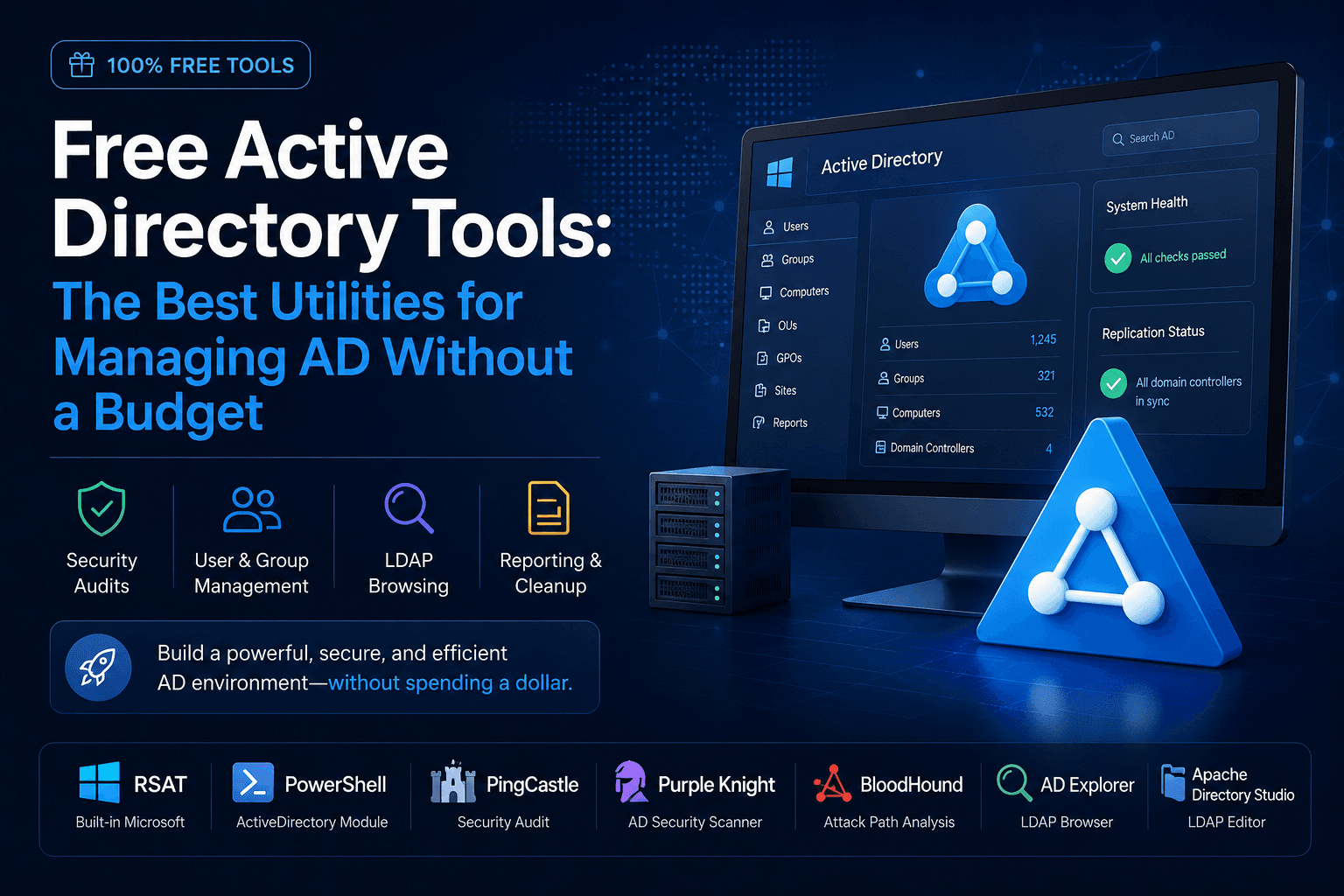
Fifteen vetted utilities—mostly from Microsoft and the security community—cover daily AD admin, audits, LDAP, GPO, and hybrid Entra ID without an enterprise IAM license.

Post by Anuj Shashimal
Founder, Founder.best11 min readUpdated
On this page
- TL;DR
- 15 free Active Directory tools at a glance
- Who this guide is for
- Built-in Microsoft administration tools (start here)
- Security auditing and attack-path analysis
- LDAP browsing and querying
- Reporting, maintenance, and cleanup
- Group Policy management
- Hybrid AD and Microsoft Entra ID
- Recommended stack by team size
- Installation and evaluation checklist
- Common mistakes
- When paid AD tools make sense
- Keep the toolkit current
- Key takeaways
- FAQ
- About the author
- Keep reading
- Tools & guides
Free Active Directory tools are the utilities small IT teams use to run a Windows domain without buying a full identity management suite. This guide is for sysadmins, MSP engineers, and technical founders who manage (or inherited) on-prem AD, hybrid Entra ID, or both.
You will get a comparison table of 15 tools, crawlable charts, install order, platform notes, and safety guardrails. Browse more guides on the Active Directory tag. Nothing here requires a paid AD product license for baseline admin and assessment—though some vendors restrict commercial resale of their free editions (called out below).
15 free Active Directory tools at a glance
These are distinct utilities covered in depth in this article—not fifteen random scripts.
| Tool | Platforms | Primary use | Cost / license |
|---|---|---|---|
| RSAT | Windows 10/11 Pro+ (client) | ADUC, Sites and Services, ADSI Edit, GPMC | Free with Windows; feature-on-demand |
| Active Directory PowerShell module | Windows (RSAT or Server) | Reporting, bulk changes, automation | Free (Windows component) |
| repadmin | Windows Server / RSAT | Replication status and forced sync | Free (built-in) |
| dcdiag | Windows Server / RSAT | Domain controller health tests | Free (built-in) |
| AD Explorer | Windows | LDAP tree browse, snapshots, attribute search | Free (Sysinternals) |
| PingCastle | Windows | AD security posture report | Free Community Edition; license terms apply to commercial reuse |
| Purple Knight | Windows | AD and Entra exposure indicators | Free Community Edition; registration for download |
| BloodHound CE | Windows, macOS, Linux (Docker) | Attack-path graph analysis | Free CE; SpecterOps EULA |
| ADRecon | Windows (PowerShell) | HTML/CSV domain inventory | Open source (check repo license) |
| Apache Directory Studio | Windows, macOS, Linux | LDAP browse, filter, edit | Free (Apache) |
| ldapsearch (OpenLDAP) | Linux, macOS, WSL | Scripted LDAP queries | Free (open source) |
| CSVDE / LDIFDE | Windows Server / RSAT | Bulk export and import | Free (built-in) |
| PolicyAnalyzer | Windows | Compare GPO sets and baselines | Free (Security Compliance Toolkit) |
| LGPO.exe | Windows | Local GPO backup/apply | Free (same toolkit) |
| IdFix | Windows | Fix sync-blocking AD attributes | Free (Microsoft download) |
Read-only vs remediation: PingCastle, Purple Knight, and ADRecon assess; they do not apply fixes. BloodHound CE visualizes paths—remediation is manual (GPO, ACL, group membership). PowerShell, ADSI Edit, CSVDE/LDIFDE, and GPMC can change production—use change control.
15 tools in this guide, grouped by job
- Microsoft built-in admin6
- Security assessors4
- LDAP browse and query3
- GPO utilities2
- Hybrid sync prep (IdFix)1
Numbers that shape a free AD + Entra stack
- 15
- Named tools in the comparison table
- 7 days
- Entra ID Free sign-in and audit log retention
- 30 days
- Entra ID P1/P2 sign-in log retention
- 4
- Read-only security assessors (PingCastle, Purple Knight, BloodHound CE, ADRecon)
Who this guide is for
- Small IT teams (roughly 20–500 users) that need RSAT-level admin plus quarterly audits.
- Hybrid shops syncing AD to Microsoft Entra ID with Azure AD Connect.
- Budget-conscious orgs comparing free utilities before paying for Tier 0 monitoring or IAM workflow tools.
If you only need cloud identity with no on-prem domain, skip RSAT and focus on Entra admin center tools in the hybrid section.
Built-in Microsoft administration tools (start here)
Install Remote Server Administration Tools before third-party downloads. These are production utilities, not trials.
RSAT: Active Directory Users and Computers (ADUC)
After RSAT is enabled, you typically get:
- Active Directory Users and Computers — users, groups, OUs, password resets
- Active Directory Sites and Services — replication topology
- ADSI Edit — low-level LDAP edits (high risk; use only with backups)
- Group Policy Management Console (GPMC) — create, link, and back up GPOs
Best for: Daily identity and GPO administration on Windows clients.
Active Directory PowerShell module
The ActiveDirectory module ships with RSAT and on Windows Server. Example: find accounts inactive for 90+ days using LastLogonTimestamp (replicated; approximate):
$cutoff = (Get-Date).AddDays(-90)
Get-ADUser -Filter * -Properties LastLogonTimestamp |
  Where-Object {
    $_.LastLogonTimestamp -and
    ([DateTime]::FromFileTime($_.LastLogonTimestamp) -lt $cutoff)
  } |
  Select-Object Name, SamAccountName, Enabled
Use -WhatIf on cmdlets that support it before bulk changes. Prefer scheduled reports over ad-hoc production edits.
Best for: Reporting, CSV-driven provisioning, and repeatable cleanup jobs.
repadmin and dcdiag
Replication failures often surface as random logon errors. Common commands:
repadmin /showrepl
repadmin /syncall /AdeP    # force sync — use with change control
dcdiag /v
dcdiag /test:dns
Run dcdiag after DC patching and when authentication fails across sites.
Best for: Multi-site domains and post-maintenance verification.
nltest and netdom
Trust and secure-channel troubleshooting:
nltest /dsgetdc:domain.com
nltest /sc_query:domain.com
netdom resetpwd /d:domain.com /s:dc01 /ud:domain\admin /pd:*
netdom resetpwd changes machine account trust—confirm the target computer name and have a recovery plan.
Best for: “Trust relationship failed” and DC locator issues.
Security auditing and attack-path analysis
These tools collect and report; plan remediation separately and test changes in a lab OU or non-production domain.
PingCastle
PingCastle produces a scored HTML report: Kerberos/NTM settings, privileged group sprawl, trusts, GPO deviations, and more. Community Edition runs from a management workstation without installing agents on domain controllers for a standard scan.
Microsoft-owned Netwrix maintains releases on GitHub. The Community Edition is free for organizations auditing their own AD; embedding PingCastle in a commercial service may require a separate license—read the download page terms before MSP use.
Best for: Quarterly health reviews and acquisition baselines.
Purple Knight (Semperis)
Purple Knight runs indicators of exposure across AD and (where configured) Entra ID. Semperis documents a built-in Community Edition license; download requires registration. The tool is designed to run without domain admin in many scenarios, but follow your change-control process and scan off-peak.
Purple Knight complements PingCastle—many teams export both reports and reconcile findings.
Best for: Hybrid AD + Entra snapshots and prioritized remediation guidance (you still apply fixes manually).
BloodHound Community Edition
BloodHound CE maps identity attack paths (for example GenericAll, WriteDACL, nested MemberOf) after data collection. Current installs typically use BloodHound CLI and Docker on a dedicated audit host.
SpecterOps requires explicit authorization before auditing networks you do not own. Notify your SOC; EDR may flag collectors. BloodHound shows paths—it does not automatically harden AD.
Best for: Annual attack-path reviews and ACL cleanup planning.
ADRecon
ADRecon outputs HTML and CSV on users, groups, computers, GPOs, trusts, and ACLs—lighter than standing up BloodHound for a quick inventory.
Best for: Documentation when you inherit an unknown domain or need M&A due diligence artifacts.
Platform fit: where each class of tool usually runs
- Windows-only admin (RSAT, repadmin, dcdiag, IdFix)8
- Cross-platform LDAP (Apache Directory Studio, ldapsearch)2
- Windows assessor + hybrid (PingCastle, Purple Knight, ADRecon)3
- Docker on any OS (BloodHound CE)1
LDAP browsing and querying
Apache Directory Studio
Apache Directory Studio is a cross-platform LDAP client. Bind to AD with appropriate credentials, run filters, and edit attributes when RSAT is unavailable (macOS/Linux).
Best for: LDAP filter development and multi-directory environments.
ldapsearch (OpenLDAP tools)
On Linux or WSL:
ldapsearch -H ldap://dc01.domain.com -D "user@domain.com" -W \
  -b "DC=domain,DC=com" "(objectClass=user)" sAMAccountName mail
Use read-only bind accounts for automation where possible.
Best for: CI pipelines and Linux-first ops teams.
Softerra LDAP Browser (not a full “Administrator” license)
Softerra LDAP Administrator is a 30-day trial, not a permanent free admin suite. The permanently free option is Softerra LDAP Browser—read-only browse/search/export. The Browser’s last listed release is older (2018 on Softerra’s download page); test compatibility with your domain functional level before relying on it.
Best for: Lightweight read-only LDAP access on Windows when Apache Directory Studio is too heavy.
Reporting, maintenance, and cleanup
Stale computers and unused groups increase noise and attack surface.
PowerShell maintenance patterns
Common reports before buying cleanup software:
- Disabled users with old LastLogonTimestamp
- Computer accounts inactive 60–90+ days (align with your deprovisioning policy)
- Empty security groups
- passwordNeverExpires on non-service accounts
- Stale adminCount after role changes
Always preview destructive cmdlets with -WhatIf and restrict script execution to named admins.
CSVDE and LDIFDE
Built-in bulk tools:
csvde -f users.csv
ldifde -f backup.ldf -d "DC=domain,DC=com"
Imports can overwrite data—test in lab, take backups, and run during maintenance windows.
Best for: Migration exports and template-driven provisioning.
Group Policy management
Group Policy Management Console (GPMC)
Included with RSAT. Use Group Policy Results and Group Policy Modeling when settings do not apply as expected.
Best for: All routine GPO work.
PolicyAnalyzer and LGPO
Download PolicyAnalyzer.zip and LGPO.zip from the Microsoft Security Compliance Toolkit. PolicyAnalyzer diffs GPO sets and exports to Excel; LGPO applies local policy backups on member servers or workstations.
See Microsoft Learn for Policy Analyzer capabilities.
Best for: Baseline drift checks (PolicyAnalyzer) and standalone servers (LGPO).
Hybrid AD and Microsoft Entra ID
Many startups run on-prem AD synced to the cloud.
Entra admin center (Free tier)
Microsoft Entra ID Free covers basic user management and Security defaults. Sign-in and audit logs retain seven days on Free—see Entra data retention. Export to Azure Monitor or upgrade if you need longer history.
Azure AD Connect (sync engine) has no separate per-user license for the sync component; you still license users according to Microsoft’s Entra and Microsoft 365 terms.
Best for: Hybrid SSO and MFA foundations alongside RSAT.
IdFix
IdFix finds attribute issues that block Azure AD Connect sync—duplicate proxyAddresses, invalid UPN characters, and similar errors.
Best for: Pre-migration remediation and Connect error triage.
dsregcmd and advanced hybrid assessment
dsregcmd /status
Shows hybrid Azure AD join state on Windows clients. Modules such as AADInternals can probe Entra and hybrid configurations—they are powerful assessment tools, not daily admin utilities. Restrict to trained staff, read-only accounts where possible, and written authorization.
Best for: Hybrid join troubleshooting and targeted security reviews.
Recommended stack by team size
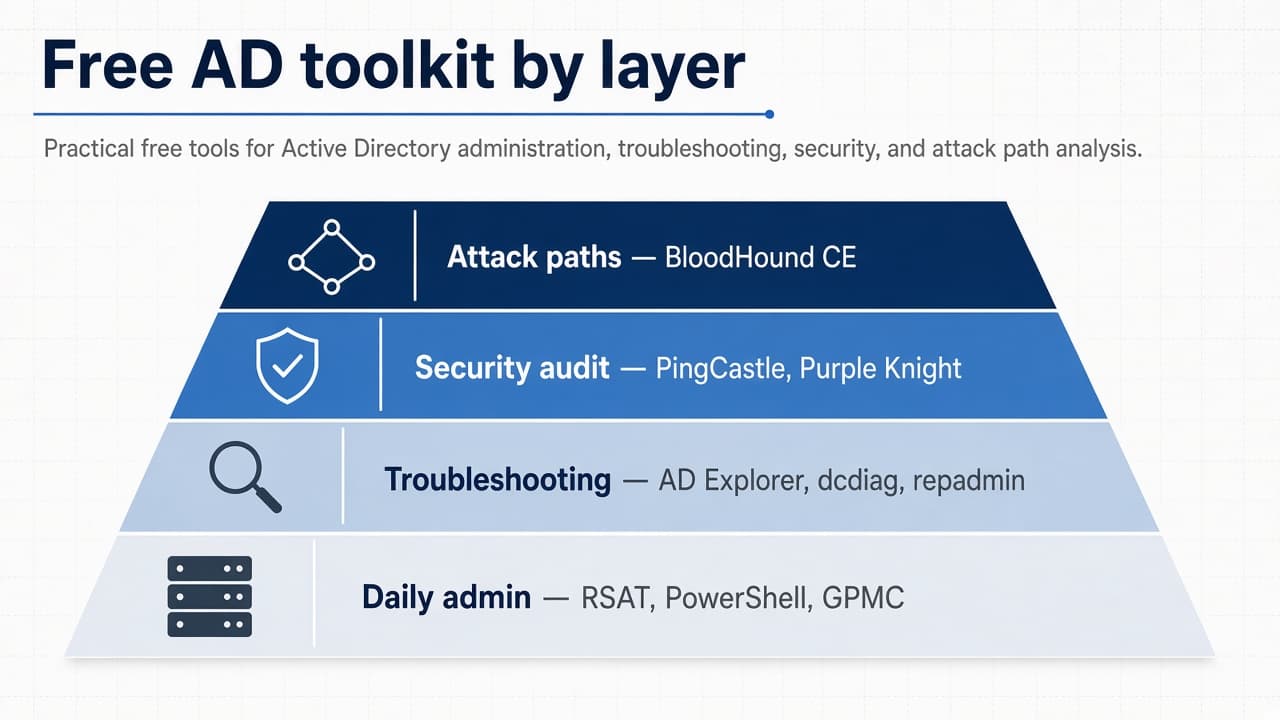
| Layer | Tools | When to use |
|---|---|---|
| Daily admin | RSAT, PowerShell AD module, GPMC | Users, groups, GPO |
| Troubleshooting | AD Explorer, dcdiag, repadmin, nltest | Auth and replication |
| Security audit | PingCastle, Purple Knight | Quarterly read-only scans |
| Attack paths | BloodHound CE | Annual or post-incident |
| Cross-platform LDAP | Apache Directory Studio, ldapsearch | macOS/Linux admins |
| Cleanup | PowerShell, CSVDE/LDIFDE | Scheduled maintenance |
| Hybrid sync | Azure AD Connect, IdFix, Entra portal | Cloud + on-prem |
Recommended adoption order for small IT teams
- 1. RSAT and PowerShell AD moduleInstall first for daily users, groups, and GPO
- 2. AD ExplorerAdd for attribute troubleshooting and LDAP paths
- 3. PingCastle or Purple KnightSchedule quarterly read-only assessments
- 4. Apache Directory Studio or ldapsearchAdd if admins work from macOS or Linux
- 5. BloodHound CE in a labRun annual or post-incident attack-path reviews
Document approved tools and who may run write operations or cleanup scripts.
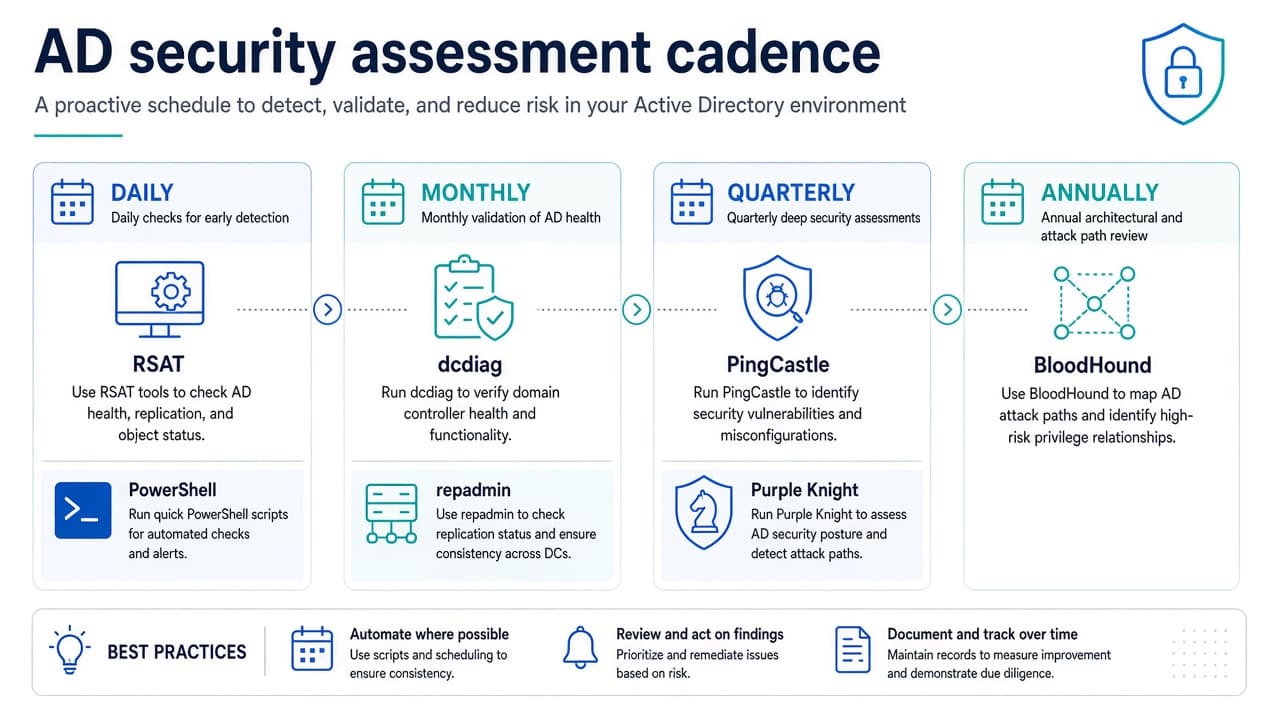
Suggested run frequency (operations calendar)
- Daily — RSAT and PowerShell tickets5 cadence slot
- Weekly — privileged group review1 cadence slot
- Monthly — dcdiag and repadmin on multi-site domains1 cadence slot
- Quarterly — PingCastle or Purple Knight1 cadence slot
- Annual — BloodHound CE path review1 cadence slot
Installation and evaluation checklist
Before adding a utility to production:
- Download source — Prefer vendor sites or Microsoft Download Center; verify SHA256 when published (Purple Knight publishes hashes on Semperis download pages).
- License fit — Confirm free use covers your scenario (internal audit vs MSP deliverable).
- Permissions — Use least privilege; assessment tools may still trigger LDAP load—schedule off-peak.
- Lab first — Run imports, cleanup scripts, and ADSI Edit changes in a test OU or lab domain.
- Exportable output — Store HTML/CSV/JSON reports quarter-over-quarter for trend tracking.
- Maintenance — Skip utilities with no updates for years; AD and attacker tradecraft move faster than stale binaries.
- Authorization — Written approval for BloodHound collectors, PingCastle, and Purple Knight in regulated environments.
Common mistakes
- Running cleanup without -WhatIf or without aligning “stale” definitions to HR/offboarding policy
- ADSI Edit deletes or DN moves without backups
- Bulk ldifde imports on multi-DC domains without checking repadmin /showrepl first
- Treating assessment output as auto-remediation—prioritize, test, then change
- Assuming Entra ID Free sign-in history covers more than seven days
- Using BloodHound or AADInternals without SOC notification
When paid AD tools make sense
Free utilities cover most startup and SMB domains until you need delegated workflows with approvals, immutable audit trails beyond Windows event forwarding, many domains under M&A, full identity lifecycle automation, or real-time Tier 0 attack detection. Until then, RSAT, PowerShell, quarterly PingCastle or Purple Knight, and AD Explorer usually deliver more value than shelfware.
Keep the toolkit current
Vendors ship new Community Edition builds regularly; Microsoft bundles Policy Analyzer and LGPO in refreshed Security Compliance Toolkit drops. Re-run assessments after every major AD or Entra change.
If you maintain content like this and see impressions without clicks in Search Console, a structured SaaS content refresh strategy (title, meta, tables, internal links—without changing the URL) is often the next step—not a new slug.
Habits that stay free:
- Quarterly PingCastle or Purple Knight report filed with IT leadership
- One automated PowerShell report (stale users, privileged group changes) per month
- Review Domain Admins and Enterprise Admins on every role change
- dcdiag after each DC patch cycle
If you build identity or security software for IT teams, a clear product page SEO foundation helps admins compare options—the same way this guide compares utilities. Launch on Founder.best when you want early adopters and an indexable listing; keep the pitch brief and accurate.
Key takeaways
- RSAT and the Active Directory PowerShell module are the daily-admin foundation on Windows; install them before third-party downloads.
- PingCastle and Purple Knight are read-only assessors—run them on a schedule, export reports, and separate findings from remediation work.
- BloodHound CE needs Docker (or BloodHound CLI), explicit permission, and SOC notice; it visualizes paths but does not replace GPO or ACL fixes.
- Entra ID Free includes sign-in and audit logs for seven days only—plan Azure Monitor or a paid SKU if you need longer retention.
- Document approved tools, who may run write operations, and require -WhatIf on cleanup scripts before production.
Frequently asked questions
What are the best free Active Directory tools?
For daily administration, RSAT (Active Directory Users and Computers) and the PowerShell ActiveDirectory module are essential. For security audits, PingCastle and Purple Knight are widely used read-only assessors. For object inspection, Sysinternals AD Explorer is the fastest GUI option. Together with ldapsearch or Apache Directory Studio for cross-platform LDAP, they cover most small-team needs without a paid license.
Are there free Active Directory tools from Microsoft?
Yes. Microsoft provides RSAT for Windows clients, the PowerShell ActiveDirectory module, repadmin, dcdiag, nltest, netdom, CSVDE, LDIFDE, Group Policy Management Console (in RSAT), Policy Analyzer and LGPO (Security Compliance Toolkit), AD Explorer (Sysinternals), IdFix, and Azure AD Connect for hybrid sync. These are production utilities—not time-limited trials—for managing your own environment.
Can I manage Active Directory for free without Windows Server?
You can browse and query AD from macOS or Linux using Apache Directory Studio, ldapsearch, or the free read-only Softerra LDAP Browser. Full user and group management, GPO editing, and domain-controller operations still require Windows with RSAT or remote access to a management host. Hybrid setups often pair on-prem tools with Microsoft Entra ID Free for cloud identity basics.
What free Active Directory tools help with security audits?
PingCastle, Purple Knight (Semperis), BloodHound Community Edition, and ADRecon focus on assessment and reporting. They highlight weak Kerberos settings, excessive privileges, and misconfigured ACLs. They are not replacements for change-controlled remediation—use their output to prioritize fixes tested in a lab first.
How often should I run free AD audit tools?
Run PingCastle or Purple Knight at least quarterly and after major changes (new trust, domain upgrade, acquisition). Use dcdiag and repadmin monthly on multi-site domains for replication health. Reserve BloodHound CE for annual deep dives or post-incident reviews so you can compare reports over time.
How do I install RSAT for Active Directory on Windows 11?
On Windows 11, open Settings → Apps → Optional features → View features, search for RSAT, and install Active Directory Domain Services and Lightweight Directory Tools plus Group Policy Management Tools. Microsoft documents the full RSAT package on Learn. After install, run optionalfeatures or manage from an elevated PowerShell session if your image uses DISM. Enterprise or Education SKUs may differ—confirm with your MDM baseline.
Ready to launch on Founder.best?
Weekly rankings, dofollow SEO backlinks, founder stories, and a community built for indie makers.
Submit your startup
About the author
Anuj Shashimal
Founder, Founder.best
SaaS founder, indie hacker, and software engineer. Anuj built Founder.best to help indie founders launch, get discovered through search and AI answers, and turn launches into customers. He writes from first-hand experience growing Founder.best from zero to 400+ founders and 300+ launched products.
Keep reading
Free tools and guides for this topic
Hand-picked from the tags on this post.
- Free tools for foundersName generator, tagline writer, slug checker, DR checker, launch checklist.
- All founder-built productsSearch and filter every product launched on Founder.best.
- Free founder toolsFree tools for startup founders in 2026: launch checklist, name generator, tagline writer, slug checker, and…
- Browse products by categorySaaS, AI, developer tools, marketing, and more.
- Launch toolsBest startup launch tools in 2026: pre-launch prep, launch platforms, post-launch SEO. Free tools,…
- Browse products by use caseStart from the job you need done, not the category label.