
SEO for founders
Product page SEO: the complete checklist for SaaS founders (2026)
Your SaaS homepage isn't the only page that can rank. Feature pages, integration pages, use-case pages, comparison pages, and even individual product listings can capture search traffic from people already looking for what you built. This checklist shows you how to turn a product page into an organic acquisition asset.

Post by Anuj Shashimal
Founder, Founder.best33 min readUpdated
On this page
- TL;DR
- What product page SEO means for a SaaS in 2026
- Search intent and keyword research
- On-page SEO for SaaS product pages
- Product page content: what to actually say
- Technical SEO for SaaS product pages
- SaaS-specific SEO: the pages beyond your homepage
- Authority and distribution
- AI search and LLM discovery
- Common product page SEO mistakes
- The final product page SEO checklist
- Turn your product page into an acquisition asset
- Key takeaways
- FAQ
- About the author
- Keep reading
- Tools & guides
Your SaaS homepage isn't the only page that can rank.
Most founders pour their SEO effort into one URL. They tweak the homepage hero, publish a few blog posts, and wait. Meanwhile, the searches that actually bring in customers look like this:
- "invoicing software with Stripe integration"
- "client reporting tool for marketing agencies"
- "Notion alternatives for small teams"
- "Linear vs Jira for startups"
Not one of those is a homepage query. Each one is a person who already knows what they need and is comparing options. Feature pages, integration pages, use-case pages, comparison pages, and even individual product listings can capture that traffic, and they convert far better than a generic blog post.
This guide is a product page SEO checklist written for SaaS founders. It is not a generic list of SEO tips. It is about turning your product pages into an organic acquisition channel: pages that rank for buyer-intent searches, answer the buyer's questions, and get your product recommended in AI answers too.
We will go through it in the order you should work:
- Search intent and keyword research
- On-page SEO
- Product page content
- Technical SEO
- SaaS-specific page types
- Authority and distribution
- AI search and LLM discovery
- The final 40-point checklist
Why product page SEO is worth a founder's time
- 96.55%
- of pages in Ahrefs' index get zero organic traffic from Google, mostly because they target no clear query or have no backlinks
- 94.74%
- of keywords get 10 or fewer searches a month, so most demand sits in specific long-tail queries like features and integrations
- 27.6%
- of clicks go to the #1 organic result on average, so ranking first for one buyer query beats ranking eighth for ten
- 2.5s
- is Google's 'good' threshold for Largest Contentful Paint, the Core Web Vital most product pages fail on mobile
What product page SEO means for a SaaS in 2026
In ecommerce, "product page SEO" means optimizing one page per item for sale. SaaS is different. You usually sell one product, but people search for it in dozens of ways: by feature, by integration, by job to be done, by industry, and by competitor.
So for a SaaS, product page SEO covers every page that describes your product to a buyer:
| Page type | Example URL | Example query it can rank for |
|---|---|---|
| Core product page or homepage | / or /product | "client reporting software" |
| Feature page | /features/white-label-reports | "white label marketing reports" |
| Integration page | /integrations/google-ads | "google ads client report tool" |
| Use-case page | /use-cases/monthly-client-reports | "automate monthly client reports" |
| Industry page | /for/marketing-agencies | "reporting tool for marketing agencies" |
| Comparison page | /vs/agencyanalytics | "agencyanalytics vs [your product]" |
| Alternatives page | /alternatives/agencyanalytics | "agencyanalytics alternatives" |
| Third-party listing | founder.best/products/your-slug | "[your product] reviews", brand searches |
Think of the core product page as the hub and everything else as spokes. Each spoke targets one specific search, answers it properly, and links back to the hub.
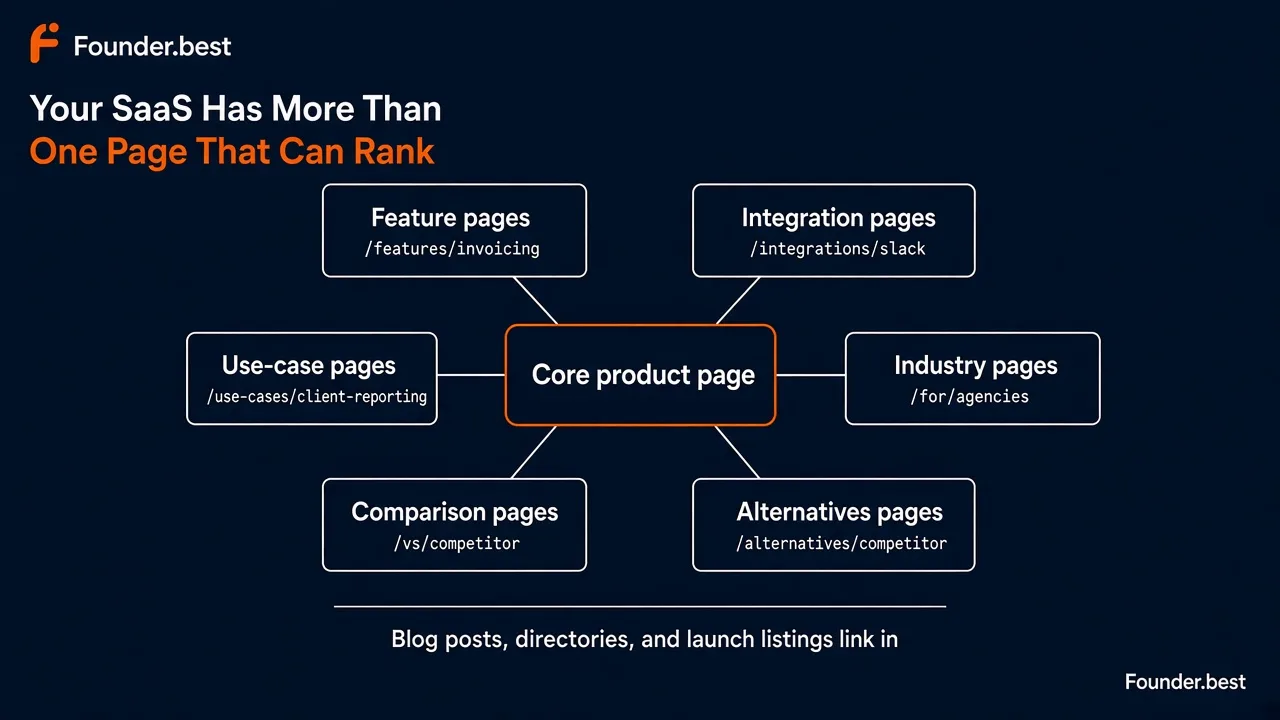
You do not need all of these on day one. A new SaaS should get the core page right first, then add spokes where there is real search demand. The rest of this guide shows you how.
Search intent and keyword research
Every strong product page starts with one question: what exactly is the person typing into Google, and what do they want to see when they click?
Get this wrong and nothing else matters. A perfectly optimized page that targets the wrong query, or the right query with the wrong page type, will not rank.
Choose one primary keyword per page
Pick one primary keyword for each URL. That is the phrase you put in the title tag, H1, URL, and first paragraph.
For a core product page, the primary keyword is usually your category plus a qualifier:
- Too broad: "reporting software" (huge competition, mixed intent)
- Better: "client reporting software"
- Best for a new site: "client reporting software for agencies"
A good primary keyword for an early SaaS has three traits. It is specific enough that a new domain can compete, it has buyer intent (the searcher wants a tool, not a definition), and it matches what your product actually does.
If you are still deciding who the product is for, go back to your SaaS validation work. The words customers used in interviews are often the best keywords you will find.
Find secondary and long-tail keywords
Secondary keywords are close variants and related questions you cover on the same page. Long-tail keywords are longer, more specific phrases with lower volume and higher intent. Most of these deserve a section on the page, not a separate page.
For "client reporting software for agencies", secondary and long-tail keywords might be:
- "automated client reports"
- "white label reporting tool"
- "client reporting dashboard"
- "how to automate client reporting"
- "client reporting software pricing"
Where to find them for free:
- Google autocomplete and "People also ask" for the exact phrasing buyers use
- Google Search Console for queries you already get impressions for, even at position 30+
- Competitor pages that rank, especially their H2s and FAQ questions
- Sales calls, support tickets, and onboarding answers for the words customers use
- Reddit and community threads where people ask for tool recommendations
For a deeper method, including how to score and prioritize keywords, see our SEO strategy for startups.
Match the search intent
Search intent is the reason behind a query. Google ranks the page type that best satisfies it, so your page type has to match what already ranks.
| Intent | Example query | What ranks | Best page for you |
|---|---|---|---|
| Informational | "how to automate client reports" | Guides, tutorials | Blog post linking to your product |
| Commercial investigation | "best client reporting tools" | Listicles, comparisons | Comparison or alternatives page, plus getting listed in others' lists |
| Commercial (product) | "client reporting software for agencies" | Product and category pages | Core product or industry page |
| Transactional | "[your product] pricing", "[your product] login" | Your own pages | Pricing page, app login |
| Navigational | "[competitor] alternatives" | Alternatives pages, listicles | Alternatives page |
A quick way to check intent: search your keyword in an incognito window and look at the top 10 results. If they are all listicles, a product page will struggle to rank there. If they are all product pages, a blog post will struggle. Build what Google is already rewarding.
Not all intent is equally valuable. The closer the query is to a buying decision, the fewer visitors you need:
Relative buyer intent by SaaS page type
- Alternatives pages90/100
- Comparison (vs) pages88/100
- Integration pages80/100
- Industry pages72/100
- Use-case pages70/100
- Feature pages65/100
- Core product page (category query)60/100
- How-to blog posts30/100
- Definition blog posts15/100
Analyze competitors that already rank
Before writing anything, open the top three to five pages for your primary keyword and note:
- Page type: product page, listicle, comparison, or guide?
- Title tag and H1: which words do they all share?
- Sections: which H2s appear on every ranking page? Those are the topics Google expects.
- Proof: screenshots, pricing, reviews, case studies, integrations?
- Gaps: what questions do they skip, dodge, or answer badly?
Your goal is not to copy them. It is to cover everything they cover, then add what they cannot: real screenshots of your product, honest pricing, a specific audience, and answers to the objections you hear on sales calls.
Use the Domain Rating checker to see how strong the ranking sites are. If every result is a DR 80+ domain, choose a more specific keyword for now.
On-page SEO for SaaS product pages
On-page SEO is where most founders can get quick wins. These elements are fully in your control and take minutes to fix.
SEO title (title tag)
The title tag is the blue headline in Google results. It is one of the strongest on-page signals and the biggest lever on click-through rate.
- Format:
Product name - primary keyword or core benefit - Length: around 50 to 60 characters, so it is not cut off in results
- Front-load: put the most important words first
- Make it specific: "for agencies" or "for Shopify stores" beats "for everyone"
Examples:
- Weak:
Home | Reportly - Better:
Reportly - Client Reporting Software for Agencies - Feature page:
White-Label Client Reports | Reportly - Integration page:
Google Ads Client Reports - Reportly Integration
Every page needs a unique title. If two pages share a title, Google has to guess which one to rank, and it often picks neither.
Meta description
The meta description does not directly affect rankings, but it is your ad copy in the search results. Google often rewrites it, especially when it does not match the query, so make it specific enough that Google wants to keep it.
- Length: about 140 to 160 characters
- Include: the primary keyword, who it is for, one concrete benefit, and a proof point or offer
- Avoid: hype words like "revolutionary" and "all-in-one" that say nothing
Example: Automated, white-label client reports for marketing agencies. Connect Google Ads and GA4 once, send branded reports every Monday. Free 14-day trial.
H1
Use exactly one H1 per page. It should say what the product is and who it is for, in plain words, and include the primary keyword or a close variant.
- Vague: "Reporting, reimagined"
- Clear: "Client reporting software for marketing agencies"
- Clear with outcome: "Send client reports in 5 minutes, not 5 hours"
If your brand team insists on a clever headline, put the clear version in the H1 and the clever line in the subheadline. Search engines, AI systems, and skimming humans all read the H1 first.
H2 and H3 structure
Headings are the outline of your page. Search engines and AI systems use them to understand which questions the page answers.
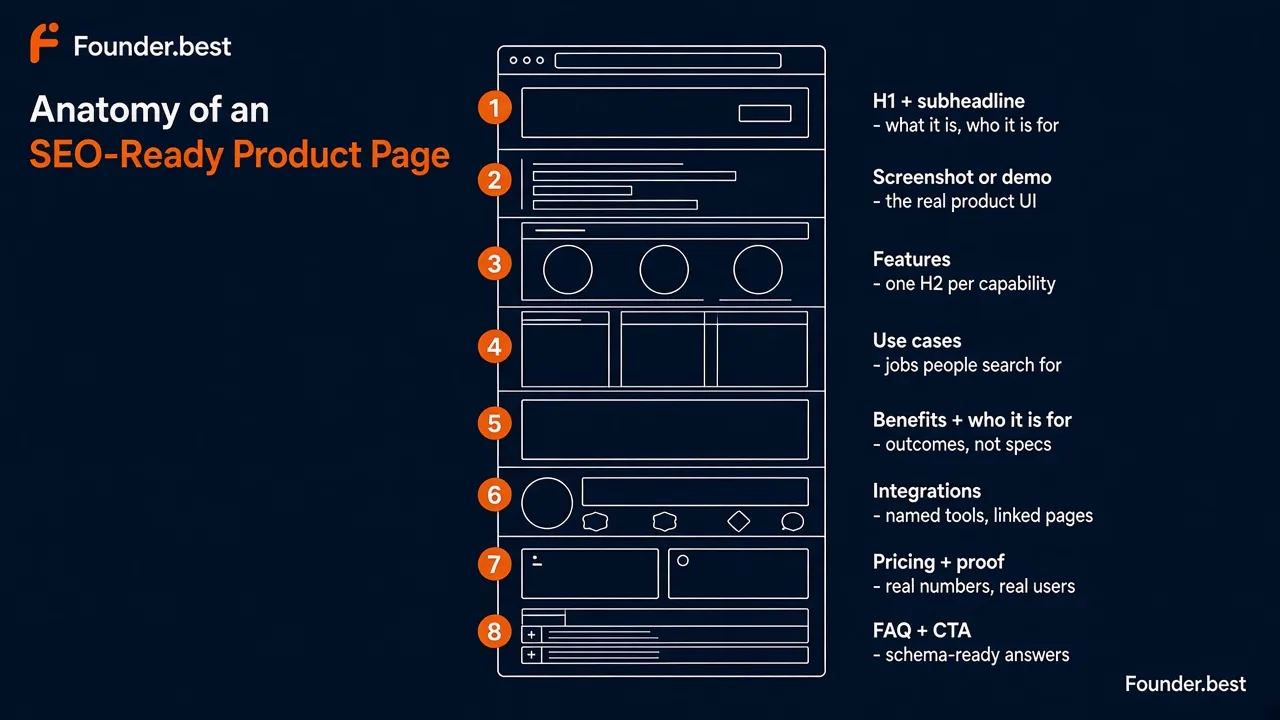
A solid structure for a core SaaS product page:
H1: Client reporting software for marketing agencies
  H2: How Reportly works
  H2: Features
    H3: White-label reports
    H3: Scheduled email delivery
    H3: Multi-client dashboard
  H2: Use cases
  H2: Who Reportly is for
  H2: Integrations
  H2: Pricing
  H2: What customers say
  H2: Frequently asked questions
Rules of thumb:
- Write headings that describe the content, not "Why us?" or "Magic happens here"
- Use your secondary keywords naturally in H2s and H3s
- Do not skip levels, for example jumping from H1 to H4
- Do not use headings just to style text bigger
URL structure
Short, readable URLs help users and search engines understand where a page sits.
| Good | Avoid |
|---|---|
/features/white-label-reports | /features?id=3829 |
/integrations/google-ads | /integration-page-google-ads-reportly-2026 |
/vs/agencyanalytics | /blog/2026/09/our-product-vs-agencyanalytics-comparison |
/for/marketing-agencies | /solutions/industries/marketing/agencies/overview |
Pick a consistent folder for each page type (/features/, /integrations/, /use-cases/, /for/, /vs/, /alternatives/) and stick to it. Use lowercase words separated by hyphens, and avoid dates in product URLs so they never look stale.
Once a URL is live and ranking, don't change it without a 301 redirect.
Keyword placement
You do not need keyword density targets. You need your primary keyword in the places that matter, and natural language everywhere else:
- Title tag
- H1
- URL slug
- First 100 words of body copy
- At least one H2
- Image alt text, where it honestly describes the image
- Meta description
Then use variants and related terms throughout: "client reports", "agency reporting", "reporting dashboard". If a sentence reads awkwardly because of a keyword, rewrite it. Readers, Google, and AI systems all reward clarity over repetition.
Image alt text
Alt text describes an image for screen readers and for search engines that cannot see it. On product pages, your screenshots are some of your most valuable content, so describe them properly.
- Weak:
alt="screenshot1"oralt="client reporting software best tool" - Good:
alt="Reportly dashboard showing a white-label monthly report for a marketing agency client"
Describe what is actually in the image, mention the product name when it is a product screenshot, and skip "image of". Decorative images like background shapes should have empty alt text (alt="").
Product page content: what to actually say
Rankings bring people to the page. Content decides whether they stay, trust you, and sign up. It is also what Google and AI systems read to decide what your product is.
A good SaaS product page answers the buyer's questions in roughly this order. If you are pre-launch or still have few customers, our guide on what to put on a SaaS landing page before you have customers covers the copy side in more depth.
Clear product description
Start with one or two sentences that a stranger could repeat back: what it is, who it is for, and what outcome it gives them.
Reportly is client reporting software for marketing agencies. It pulls data from Google Ads, Meta, and GA4 into white-label reports and emails them to clients automatically.
This one paragraph does a lot of work. It is your hero copy, your meta description draft, your directory listing description, and the sentence you want AI systems to quote. Write it once, carefully, and reuse it everywhere.
Features
List your main capabilities, each with its own H3, a short explanation, and ideally a screenshot. Write each one benefit first:
| Feature (what it is) | Benefit (why they care) | Search it can match |
|---|---|---|
| Scheduled report delivery | Reports go out every Monday without anyone remembering to send them | "automated client reports" |
| White-label templates | Every report looks like your agency made it | "white label reporting tool" |
| Multi-client dashboard | See every account's performance on one screen | "client reporting dashboard" |
Three to six features is plenty for a core page. Your strongest features, the ones people search for by name, deserve their own feature pages later.
Use cases
Use cases describe the jobs people hire your product for. They match how buyers search ("automate monthly client reports") better than feature names do.
Write two to four short scenarios: who, the situation, and the result. "An agency with 20 clients uses Reportly to replace a full day of manual reporting each month." Each strong use case can later become its own page.
Benefits
Benefits are outcomes: time saved, money made, risk reduced, stress removed. Put numbers on them when you can prove them ("teams save about 6 hours a month on reporting") and be honest when you can't.
Who it's for
This section is underrated for both conversion and SEO. Say plainly who the product is for, and who it is not for:
- Best for: marketing agencies managing 5 to 50 clients
- Also works for: freelance marketers and in-house teams reporting to leadership
- Not a fit for: enterprise teams that need a full BI tool
The "not for" line builds trust with humans. It also gives AI systems a clear, quotable answer when someone asks "what is the best reporting tool for a small agency?"
Integrations
List integrations by name, with logos and links to each integration page. "Works with Google Ads, Meta Ads, GA4, HubSpot, and Slack" is useful. "100+ integrations" is not.
Integration names are some of the most searched terms in SaaS. Every name you list in HTML text is a chance to match a query.
Screenshots and demo
The product is your best proof. Show it.
- One real hero screenshot of your main screen, not a stock illustration
- Annotated screenshots next to each feature
- A 30 to 90 second demo video or GIF of the core workflow
- An interactive demo if your product needs data to look good
Compress images (see the technical section), give each one descriptive alt text, and make sure the important claims also appear in text. Text inside an image is much harder for search engines and AI systems to read.
Pricing and proof
Show at least a starting price. "Contact sales" with no number makes many buyers leave and leaves AI systems guessing. Then add the proof you actually have: customer quotes with names and roles, logos you have permission to use, review ratings, or launch badges.
FAQs
An FAQ section answers the objections that stop people from signing up, and gives search engines and AI systems clean question-answer pairs.
Good product page FAQs come from sales calls and support tickets, not from guessing:
- "Does it work with [tool]?"
- "How long does setup take?"
- "Can I cancel anytime?"
- "Is my data secure?"
- "How is this different from [competitor]?"
Keep answers to two to four sentences, start with a direct answer ("Yes. ...", "About 10 minutes. ..."), and update them whenever the product changes.
Technical SEO for SaaS product pages
Technical SEO decides whether Google can find, render, and trust your page. It is less exciting than copy, but one wrong setting can make a great page invisible.
Indexability
First, make sure the page can be indexed at all:
- No
noindextag left over from staging or a page builder setting - Not blocked in
robots.txt - Returns a 200 status code, not a redirect chain or soft 404
- Listed in your XML sitemap
- Key content is in the HTML. If your product page is a client-side React app that renders text only after JavaScript runs, check what Google sees with the URL Inspection tool in Search Console. Server-side rendering or static generation is the safer choice for marketing pages.
Run site:yourdomain.com/your-page in Google, or inspect the URL in Google Search Console, to confirm the page is indexed.
Canonical URL
A canonical tag tells Google which version of a page is the main one. SaaS sites often create duplicates by accident:
https://vshttp://,wwwvs non-www- Trailing slash vs no trailing slash
- UTM parameters from campaigns (
?utm_source=...) - A/B test variants and localized copies
- The same feature described on
/features/xand/product#x
Every page should have a self-referencing canonical tag (<link rel="canonical" href="https://yourdomain.com/features/white-label-reports">), and duplicates should point to the main version. If two pages target the same keyword, merge them rather than relying on canonicals to sort it out.
Internal linking
Internal links tell Google which pages matter and how they relate. They also pass authority from pages that have backlinks (often your homepage and best blog posts) to pages that need it.
For product pages:
- Link to your core product page and key feature pages from the main navigation
- Link every feature, integration, and use-case page back to the core product page
- Link between related spokes, for example from an integration page to the use cases it supports
- Add contextual links from blog posts to the most relevant product page, using descriptive anchor text like "white-label client reports" rather than "click here"
- Make sure no product page is an orphan with zero internal links pointing to it
A simple test: every important product page should be reachable within three clicks from the homepage.
Structured data
Structured data (schema markup) describes your product to machines in a standard format. For SaaS, start with SoftwareApplication:
{
  "@context": "https://schema.org",
  "@type": "SoftwareApplication",
  "name": "Reportly",
  "description": "Client reporting software for marketing agencies. Automated, white-label reports from Google Ads, Meta, and GA4.",
  "url": "https://reportly.example/",
  "applicationCategory": "BusinessApplication",
  "operatingSystem": "Web",
  "offers": {
    "@type": "Offer",
    "price": "29.00",
    "priceCurrency": "USD"
  }
}
Also add:
- Organization schema on the homepage, with your logo and
sameAslinks to your social profiles, directory listings, and founder profiles - BreadcrumbList on feature, integration, and use-case pages
- aggregateRating or review only when ratings come from real customer reviews. Google's software app rich result requires one of them, and invented ratings can lead to a manual action.
- FAQPage markup is still valid and helps machines parse your FAQ. Just don't expect FAQ rich results: since 2023 Google shows them only for a small set of well-known, authoritative sites.
Validate everything with Google's Rich Results Test before you ship. Make sure the schema matches the visible page. If your schema says $29 and the page says $39, you are sending mixed signals to Google and to AI systems.
Core Web Vitals
Core Web Vitals are Google's page experience metrics. They are a tiebreaker rather than a primary ranking factor, but slow pages also convert worse, so fixing them pays off twice.
Core Web Vitals: what 'good' means
- 2.5s or less
- Largest Contentful Paint (LCP) - how fast the main content, usually your hero image or headline, appears
- 200ms or less
- Interaction to Next Paint (INP) - how quickly the page responds when someone clicks, taps, or types
- 0.1 or less
- Cumulative Layout Shift (CLS) - how much the layout jumps around while the page loads
- 75%
- of real visits must meet each threshold for the page to pass, measured separately on mobile and desktop
The usual culprits on SaaS product pages:
- Huge hero images or autoplay videos (fix: compress, resize, preload the hero, lazy-load the rest)
- Heavy third-party scripts like chat widgets, analytics stacks, and A/B testing tools (fix: delay non-critical scripts until after load)
- Web fonts causing layout shift (fix:
font-display: swapand preloaded fonts) - Images and embeds without dimensions (fix: always set width and height)
Mobile UX
Google indexes the mobile version of your page first. Many B2B founders only ever look at their product page on a big monitor, and it shows.
Check on a real phone:
- The H1 and primary CTA are visible without scrolling
- Text is readable without zooming (16px body text is a safe minimum)
- Buttons and links are big enough to tap and not crammed together
- Feature tables and pricing tables scroll or stack instead of overflowing
- No pop-up covers the content as soon as the page loads
Image optimization
Images are usually the heaviest part of a product page. Fix them:
- Serve WebP or AVIF instead of large PNGs
- Resize to the largest display size you need. A 4,000px screenshot shown at 1,200px wastes bandwidth.
- Lazy-load images below the fold, but never the hero image
- Set explicit width and height to prevent layout shift
- Use descriptive file names (
reportly-white-label-report.webp, notIMG_2381.png) - Write alt text for every meaningful image
SaaS-specific SEO: the pages beyond your homepage
This is where SaaS product page SEO becomes an acquisition channel. Each page type below targets a different kind of buyer search. Build them in order of intent and evidence of demand, not all at once.
The order most early SaaS teams should build product pages
- 1. Core product pageyour category keyword and brand searches
- 2. Feature pagesyour 2 to 4 most searched capabilities
- 3. Integration pagestools your buyers already use
- 4. Comparison and alternatives pagescompetitors your buyers already know
- 5. Use-case and industry pagesspecific jobs and audiences with real search demand
- 6. Programmatic pagesonly once you have unique data for every page
Feature pages
A feature page targets people searching for a specific capability: "white label client reports", "automated invoice reminders", "AI meeting notes".
Build one when a feature:
- Has its own search demand (check autocomplete and keyword tools)
- Is a real differentiator, or a "must have" buyers screen for
- Has enough to say for a full page: how it works, screenshots, use cases, and an FAQ
A strong feature page has a keyword-focused H1, a clear explanation of the problem the feature solves, screenshots or a short video, how it fits into the wider product, and a link back to the core product page. Avoid separate pages for minor settings. "Dark mode" rarely needs its own URL.
Integration pages
Integration pages are one of the best SEO assets a SaaS can build. People search for "[your category] + [tool they already use]" all the time, and the competition is often weak.
Each integration page should include:
- What the integration does, in one sentence
- What data syncs and in which direction
- Real setup steps, with screenshots
- Two or three use cases specific to that combination
- Limitations and requirements, such as plans or permissions
- Links to the partner's docs and back to your core product page
Bonus: integration partners often list you in their app marketplace or partner directory, which is a relevant backlink and a source of referral traffic.
Use-case pages
Use-case pages target the job, not the tool: "automate client reporting", "collect testimonials from customers", "track SaaS churn". These searchers might not know a product like yours exists yet.
Write each page around the workflow: the problem, the old way, the new way with your product, a step-by-step example, and the result. Use real examples and screenshots so the page is clearly more than a reworded feature list.
Industry pages
Industry pages ("for marketing agencies", "for law firms", "for Shopify stores") work when your product genuinely serves that industry differently: different terminology, workflows, compliance needs, integrations, or examples.
If the only thing that changes between your "for agencies" and "for consultants" pages is the word in the headline, you don't have two industry pages. You have one page and a duplicate. Add industry-specific examples, testimonials, templates, and FAQs, or don't build the page.
Comparison pages
Comparison pages target "[your product] vs [competitor]" and "[competitor A] vs [competitor B]" queries. These searchers are close to a decision, which makes these some of the highest-converting pages a SaaS can own.
What makes them work:
- Honesty. Say where the competitor is better. Buyers and AI systems trust balanced comparisons more than one-sided ones.
- Facts. Compare pricing, features, integrations, limits, and support side by side in a table.
- Who should pick which. "Choose [competitor] if you need X. Choose us if you need Y."
- Freshness. Show a "last updated" date and check competitor pricing every quarter.
Alternatives pages
"[Competitor] alternatives" pages capture people who are unhappy with a tool or shopping around. The best format is a genuine list of several options, including yours, with honest pros, cons, and pricing for each.
A page that lists only your product under an "alternatives" title rarely ranks, because it does not match the intent. Searchers want a list. Give them a fair one and make your product the clearest choice for a specific type of buyer.
For examples of the format, see how we cover launch platform alternatives on Founder.best.
Programmatic SEO without creating thin pages
Programmatic SEO means generating many pages from a template plus a dataset, such as one page for every integration, template, or city. Done well, it can capture thousands of long-tail searches. Done badly, it produces hundreds of near-identical pages that Google ignores or penalizes.
Google's spam policies call out scaled content abuse: producing many pages mainly to manipulate rankings, with little value for users, whether written by AI, humans, or templates. Read the policy before you generate anything at scale.
| Signal | Thin programmatic page | Useful programmatic page |
|---|---|---|
| Content | Same intro on every page with the keyword swapped | Unique data or examples for each page |
| Depth | No information beyond the page title | Real setup steps, numbers, screenshots, or templates |
| Demand | Hundreds of pages nobody searches for | Pages mapped to queries with real demand |
| Links | No internal links in or out | Linked from hub pages and relevant content |
| Freshness | Never updated | Data refreshes when the source changes |
A practical test: would this page still be useful if it were the only page of its kind on your site? If not, don't publish it. Start with 10 to 20 pages, check that they get indexed and earn impressions, then scale.
Authority and distribution
Great on-page work gets you into the race. Authority is what lets you win competitive queries. For a young SaaS, authority comes from two places: links and mentions from other relevant sites, and internal links from your own content.
Where a new SaaS should spend its first 20 hours of off-page work
- Internal links from existing blog posts3h
- Curated directories and launch platforms4h
- Founder profiles and community answers4h
- Integration partner and marketplace listings3h
- Review site profiles2h
- Outreach for listicles and comparison mentions4h
Internal links from blog content
Your blog posts often earn more backlinks than your product pages, because people link to useful guides, not sales pages. Internal links pass some of that authority to the pages that make money.
- For every product page, find three to five blog posts on related topics
- Add a contextual link in the body copy, not just in a footer or sidebar
- Use descriptive anchor text that matches the target page's topic
- When you publish a new blog post, link it to at least one product page
This is the backbone of a good content marketing strategy for startups: informational posts attract readers, and internal links route them to the product.
Backlinks
Backlinks from relevant, trusted sites are still one of the strongest ranking signals. For product pages, the best links come from:
- Listicles and comparison articles in your category ("best client reporting tools")
- Integration partners linking to your integration pages
- Customers and agencies that mention tools they use
- Podcasts and founder interviews that link to your site
- Original data or free tools that people reference
Avoid paid link farms and private blog networks. They are against Google's spam policies and can do more harm than good. Our guides on SaaS link building and high authority backlinks cover how to earn links that last.
Product directories and launch platforms
Directories and launch platforms give a new product page its first backlinks, an extra indexed page that describes your product, and real early users. Quality matters far more than quantity.
When you launch on Founder.best, your product gets:
- A permanent, indexable product page at
founder.best/products/your-slug - A dofollow backlink to your site, live immediately on paid plans and from launch week on free launches
- Categories, upvotes, comments, and a launch date, which add context about what the product is and that real people use it
- SoftwareApplication structured data on the listing, so search engines and AI systems can parse it
- A link to your founder profile
- Product updates that keep the listing fresh
There is a free launch option, and paid plans add instant go-live and more homepage visibility. See pricing for the current plans. Use the slug checker first so your listing URL matches your brand name.
Then pick a handful of other curated, relevant directories. Our guide to the best SaaS directories explains which ones are worth your time.
Founder profiles
People search for founders as well as products, and AI systems connect founders to the companies they build. A consistent founder presence strengthens your product's entity signals.
- Use the same name, photo, and one-line bio across LinkedIn, X, GitHub, and your Founder.best profile
- Link each profile to your product's site and the site to the profiles (Organization schema
sameAsand a founder section on your About page) - Answer questions in your niche under your own name
This is also the heart of founder-led SEO. Early on, your personal credibility is one of your product's strongest trust signals.
Reviews
Reviews help in three places: they convert visitors on your page, they rank for "[your product] reviews" searches, and they are a source AI systems check when recommending tools.
- Ask happy users for a review at a natural moment, such as after a successful first report
- Set up profiles on the review sites your buyers actually use (G2, Capterra, or niche review sites in your industry)
- Reply to reviews, including negative ones
- Show real reviews on your product page, and mark up ratings only when they come from genuine reviews
Communities
Reddit, Indie Hackers, Slack groups, Discord servers, and niche forums are where buyers ask for recommendations, and those threads increasingly rank in Google and get cited in AI answers.
Be useful first. Answer questions in detail, share what you have learned, and mention your product only when it genuinely solves the problem being discussed. Disclose that you are the founder. A few honest, helpful mentions do more than dozens of drive-by links.
AI search and LLM discovery
Buyers now ask ChatGPT, Perplexity, Claude, and Google's AI Overviews "what's the best tool for X?" These systems do not rank pages the same way Google's classic results do. They assemble answers from sources they can understand and verify, and they recommend products whose facts agree across those sources.
The good news: almost everything in this checklist already helps. The AI layer is mostly about clarity and consistency.
How an AI system decides whether to recommend your product
- 1. Discovercrawlers can reach your pages and listings
- 2. Understandplain text says what the product is, who it is for, and what it costs
- 3. Verifythe same facts appear on independent sources like directories, reviews, and founder profiles
- 4. Compareyour page states clear strengths, limits, and best-fit audience
- 5. Recommendyour product is named, ideally with a citation link
Clear entity and product information
An "entity" is a distinct thing a search engine or AI system knows about, such as your company, your product, or you as a founder. Help it understand yours:
- State the product name, category, audience, and core function in the first paragraph, in plain HTML text
- Have a clear About page with company name, founders, founding year, and location
- Use Organization and SoftwareApplication schema with
sameAslinks to your official profiles and listings - Avoid ambiguous naming. If your product name is a common word, pair it with the category, for example "Reportly client reporting software".
Consistent product descriptions
When your site says "AI meeting assistant", your Founder.best listing says "productivity platform", and your G2 profile says "transcription software", AI systems have to guess, and they often pick a competitor with a clearer story.
Write one canonical set of product facts and reuse it everywhere:
| Fact | Example | Keep identical across |
|---|---|---|
| Product name and spelling | Reportly | Website, directories, launch platforms, reviews, social bios |
| One-line description | Client reporting software for marketing agencies | Hero, meta description, listings, founder bios |
| Category | Business software, reporting | Schema, directory categories, comparison pages |
| Pricing model and starting price | Subscription, from $29/month | Pricing page, schema, listings, FAQ |
| Primary audience | Agencies with 5 to 50 clients | Product page, listings, sales decks |
Update every listing when your positioning or pricing changes. Outdated listings are one of the most common reasons AI answers get product facts wrong.
Structured content
AI systems extract answers more easily from well-structured pages:
- Descriptive headings that match real questions
- Short paragraphs that lead with the answer
- Tables for pricing, features, and comparisons
- Lists for features, integrations, and steps
- FAQs with direct answers in the first sentence
Write each section so it makes sense on its own when quoted. "Reportly starts at $29 per month for up to 10 clients" is quotable. "It's affordable for most teams" is not.
You can also publish an llms.txt file at your domain root that points AI tools to your most important pages. It is a proposed convention rather than an official standard, and Google says it does not use it, so treat it as a cheap extra, not a strategy.
Citations and mentions
AI answers lean heavily on third-party sources: "best tools" listicles, comparison articles, Reddit threads, review sites, and directories. If your product is not mentioned in those places, it is unlikely to be recommended, however good your own page is.
- Get listed in the directories and launch platforms AI tools already cite
- Pitch inclusion in "best [category] tools" articles that rank for your keywords
- Contribute genuine answers in communities where buyers ask for recommendations
- Encourage reviews on the platforms your buyers trust
Make product information easy for AI systems to understand
A quick self-test. Ask ChatGPT and Perplexity these questions about your product and log the answers once a month:
- "What is [product]?"
- "Who is [product] for?"
- "How much does [product] cost?"
- "What are the best alternatives to [competitor]?"
- "What is the best [category] tool for [your audience]?"
When the answers are wrong or missing, trace them back. Is the fact missing from your product page? Hidden in an image? Contradicted by an old directory listing? Fix the source and check again next month.
For a deeper dive, read how to increase your SaaS brand's visibility in AI answers and our roundup of AI search visibility tools.
Common product page SEO mistakes
Most product pages that don't rank fail for a handful of predictable reasons:
- The hero never says what the product does. "Work smarter" is not a category.
- The title tag is just the brand name. You waste the strongest on-page signal.
- Several pages target the same keyword. The homepage,
/product, and/featuresall compete, and none win. - Key information is locked in images or client-side JavaScript. Search engines and AI systems can't read it reliably.
- Fake or unsupported ratings in schema. This risks a manual action and destroys trust.
- Programmatic pages with nothing unique on them. Thin pages can drag down the whole site.
- A 3MB hero image. The page fails LCP on mobile and visitors leave before it loads.
- Product facts differ across the web. AI systems skip products they can't verify.
- Set and forget. Pricing changes, features ship, competitors move, and the page stays frozen.
If your product is live but signups are flat, our post-launch SEO checks walk through how to diagnose which of these is hurting you.
The final product page SEO checklist
Work through this list one page at a time, starting with your core product page. Most founders can finish the first pass in a weekend.
 Copyable checklist
Product page SEO checklist for SaaS founders (2026)
Keyword research and intent
☐ One primary keyword chosen for this page, specific enough for your domain to compete
☐ 5 to 10 secondary and long-tail keywords collected from autocomplete, Search Console, and sales calls
☐ Top 10 results checked in incognito, and the page type matches what already ranks
☐ Top 3 competing pages reviewed for sections, proof, and gaps
☐ No other page on your site targets the same primary keyword
On-page SEO
☐ Unique title tag of about 50 to 60 characters, with the keyword near the start
☐ Meta description of about 140 to 160 characters with audience, benefit, and offer
☐ Exactly one H1 that says what the product is and who it is for
☐ Logical H2 and H3 structure using descriptive headings
☐ Short, lowercase, hyphenated URL in a consistent folder
☐ Primary keyword in the first 100 words and at least one H2
☐ Descriptive alt text on every meaningful image
Product page content
☐ One or two sentence product description a stranger could repeat back
☐ 3 to 6 features written benefit first, each with a screenshot
☐ 2 to 4 concrete use cases
☐ "Who it's for" and "not for" section
☐ Integrations listed by name and linked to their pages
☐ Real screenshots or a short demo video of the actual product
☐ Starting price visible, plus real social proof
☐ FAQ with 5 to 8 questions taken from sales and support conversations
Technical SEO
☐ Page is indexable: no noindex tag, not blocked by robots.txt, returns 200, included in sitemap
☐ Self-referencing canonical tag, with duplicates and parameter URLs pointing to it
☐ Key content renders in the HTML, checked with Search Console URL Inspection
☐ SoftwareApplication schema with name, description, category, and offers, validated in the Rich Results Test
☐ Organization schema with sameAs links, and breadcrumbs on deeper pages
☐ Ratings in schema only when they come from real reviews
☐ Core Web Vitals pass on mobile: LCP 2.5s or less, INP 200ms or less, CLS 0.1 or less
☐ Mobile check done on a real phone: readable text, tappable buttons, no overflow
☐ Images compressed as WebP or AVIF, resized, with set dimensions, and lazy-loaded below the fold
SaaS-specific pages
☐ Feature pages for your 2 to 4 most searched capabilities
☐ Integration pages for the tools your buyers already use
☐ Honest comparison and alternatives pages for competitors buyers already know
☐ Use-case and industry pages only where you have unique examples and real demand
☐ Programmatic pages tested in small batches, each with unique, useful data
Authority and distribution
☐ 3 to 5 contextual internal links from relevant blog posts to each product page
☐ Product launched on curated directories and launch platforms such as Founder.best
☐ Founder profiles consistent and linked to the product
☐ Review profiles set up on the sites your buyers use
AI search and LLM discovery
☐ Product name, one-liner, category, pricing, and audience identical everywhere
☐ Monthly AI prompt check done, with wrong or missing facts traced back and fixed at the source
Turn your product page into an acquisition asset
Product page SEO isn't a one-time task. It is a system. A clear core page, a growing set of feature, integration, and comparison pages, and a steady flow of links and mentions that point back to them.
If you only do three things this week:
- Fix the core page: a specific title tag, one clear H1, real screenshots, a "who it's for" section, and SoftwareApplication schema.
- Build one high-intent spoke: your most requested integration page or an honest comparison with your best-known competitor.
- Get your first third-party proof: launch on Founder.best for a permanent listing, a dofollow backlink, and your first upvotes from real founders and early adopters.
Do that, and your product page stops being a brochure and starts being a page people find when they are ready to buy.
Related guides: SaaS landing page before customers · SEO strategy for startups · Content marketing for startups · SaaS link building · How to validate SaaS ideas · SaaS launch checklist
Key takeaways
- Your homepage is one page. A SaaS can rank with dozens of product-facing pages: features, integrations, use cases, industries, comparisons, and alternatives.
- Give every page one primary keyword and one search intent. If two pages target the same query, merge them or point one at the other with a canonical tag.
- Most product page SEO wins are boring: a specific title tag, one H1, real screenshots, a clear "who it's for" section, and an FAQ that answers buyer objections.
- Technical basics decide whether you get a chance at all. Check that each page is indexable and canonical, passes Core Web Vitals on mobile, and has valid SoftwareApplication schema.
- Programmatic SEO works for SaaS only when each generated page carries unique, useful data. Templates with a swapped keyword are thin content and can hurt the whole site.
- AI search tools recommend products they can understand and verify. Use the same product name, one-line description, category, and pricing everywhere, from your site to directories, launch listings, and founder profiles.
Frequently asked questions
What is product page SEO for SaaS?
Product page SEO for SaaS is the work of making your product-facing pages rank in search and convert the visitors they bring. It covers keyword research and search intent, on-page elements like the title tag, H1, and meta description, product content such as features, use cases, and integrations, technical SEO like indexability, schema, and page speed, and off-page signals like backlinks, directory listings, and reviews. For SaaS, it also includes supporting page types such as feature, integration, comparison, and alternatives pages.
Should my SaaS homepage or a dedicated product page target my main keyword?
For a single-product SaaS, the homepage is usually the right target for your brand and core category keyword. Once you have distinct features, integrations, or audiences, give each one its own page with its own keyword instead of trying to rank the homepage for everything. The rule is one primary keyword per URL, so pages do not compete with each other.
How long should a SaaS product page be?
Long enough to answer the questions a buyer has before signing up. For most SaaS product pages that is roughly 600 to 1,500 words across the hero, features, use cases, integrations, pricing, proof, and FAQ. Feature and integration pages can be shorter if they are specific. Word count is not a ranking factor on its own, but pages under about 300 words rarely explain a product well enough to rank or convert.
Which schema markup should a SaaS product page use?
Use SoftwareApplication (or WebApplication) JSON-LD with the product name, description, URL, application category, operating system, and an offers block with price and currency. Add Organization schema for your company and BreadcrumbList for deeper pages. Google's software app rich result also needs a real aggregateRating or review, so only add ratings that come from genuine reviews. FAQPage markup is fine to keep for clarity, but since 2023 Google shows FAQ rich results only for a small set of authoritative sites.
Are comparison and alternatives pages worth it for an early SaaS?
Yes, often more than blog posts. Someone searching "[competitor] alternatives" or "[competitor] vs [competitor]" is already shopping for a product in your category, so these pages convert far better than informational content. Keep them honest. Say where the competitor is the better choice, compare on facts like price and features, and update the page when either product changes.
What is programmatic SEO and is it safe for SaaS?
Programmatic SEO means generating many pages from a template and a dataset, such as one page per integration or per industry. It is safe when every page contains genuinely unique, useful information, such as real setup steps, data, examples, or screenshots for that specific combination. It becomes risky when pages differ only by a swapped keyword. Google's spam policies treat mass-produced, low-value pages as scaled content abuse, which can drag down the whole site.
How long does product page SEO take to work?
Technical fixes and title rewrites can change impressions within a few weeks once Google recrawls the page. New pages on a young domain usually take three to six months to rank for competitive terms, and long-tail feature or integration keywords often move faster. Backlinks and internal links from relevant pages shorten the timeline.
How do I get my SaaS recommended in ChatGPT, Perplexity, and Google AI answers?
Make your product easy to understand and easy to verify. State what it is, who it is for, and what it costs in plain HTML text on your product page. Use structured data and an FAQ. Keep the same product name, description, category, and pricing on your site, directories, launch platforms, review sites, and founder profiles. Then earn mentions in comparison articles, communities, and listicles that AI systems already cite.
Does listing my SaaS on directories help product page SEO?
Good directories help in three ways: a backlink to your product page, an extra indexed page that describes your product, and a third-party source that confirms your product facts for search engines and AI systems. Focus on curated, relevant directories and launch platforms with real traffic, like Founder.best, rather than mass-submitting to hundreds of low-quality sites.
What are the most common product page SEO mistakes?
The most common mistakes are a vague hero that never says what the product does, a title tag that is only the brand name, several pages competing for the same keyword, key information locked inside images or client-side JavaScript, missing or fake schema ratings, heavy hero images that fail Core Web Vitals on mobile, and product descriptions that differ from one site to the next.
Ready to launch on Founder.best?
Weekly rankings, dofollow SEO backlinks, founder stories, and a community built for indie makers.
Submit your startup
About the author
Anuj Shashimal
Founder, Founder.best
SaaS founder, indie hacker, and software engineer. Anuj built Founder.best to help indie founders launch, get discovered through search and AI answers, and turn launches into customers. He writes from first-hand experience growing Founder.best from zero to 400+ founders and 300+ launched products.
Keep reading
Free tools and guides for this topic
Hand-picked from the tags on this post.
- Free Ahrefs Domain Rating checkerLive DR (0–100) for any domain before you chase a backlink.
- Product slug checkerSee if your founder.best/products/ URL is still free.
- Get your product discovered by AI assistantsWhich listing fields make your product rank for the right questions.
- Free SaaS directories for backlinksList of free SaaS and startup directories with dofollow filters, Ahrefs DR scores, and a submission checklist.
- Startup tagline generator12 tight one-liners for your landing page and launch post.
- Startup launch statistics & researchOriginal launch data plus sourced figures on AI search and startup failure.