

How to make a SaaS launch video in 2026 (even without a video team)
You don't need a studio, a motion designer, or a big budget. You need one clear workflow, a 60-second script, a clean screen recording, and captions. Here's the whole process, from blank page to a video you can post on launch day.

Post by Anuj Shashimal
Founder, Founder.best11 min readLast updated
On this page
- TL;DR
- What is a SaaS launch video?
- Why your SaaS launch needs a video
- The 3 launch videos every SaaS needs
- How to write a 60-second launch video script
- How to make a SaaS launch video step by step
- The best tools to make a launch video in 2026
- Video formats and lengths by platform
- Where to publish your SaaS launch video
- Common launch video mistakes to avoid
- Your SaaS launch video checklist
- Go deeper on your launch
- Ship the video this week
- Key takeaways
- FAQ
- About the author
- Keep reading
- Tools & guides
Every launch checklist says the same thing: add a short demo video. Then it moves on, as if making one were easy.
It isn't, the first time. You open a screen recorder, click around your app for four minutes, and end up with something nobody will finish watching.
The good news is that a SaaS launch video doesn't need a production budget. It needs a clear plan. A small team, or one founder with a laptop, can make a video that explains the product faster than any landing page.
This guide walks you through the whole thing: which videos to make, how to script them, how to record and edit without a video team, which tools help, and where to post the result.
How a SaaS launch video gets made
- 1. Pick one workflowThe single job your product does best
- 2. Write a 60-second scriptHook, problem, product, proof, call to action
- 3. Record screen and voiceShort screen takes, voiceover recorded separately
- 4. Edit for paceCut dead air, add zooms and captions
- 5. Export and publish16 by 9, 9 by 16, and square versions for each channel
What is a SaaS launch video?
A SaaS launch video is a short video that shows what your product does by walking through one real workflow, from the problem to the result.
It's different from a brand film or a feature tour. Viewers should finish it knowing three things: who it's for, what it fixes, and what to do next.
Most launch videos are screen recordings with a voiceover and captions. That's not a shortcut. It's the format that works, because buyers want to see the actual interface before they sign up.
Why your SaaS launch needs a video
A good demo answers the question every visitor has: what does this actually look like?
Screenshots show moments. A video shows the flow between them. That's usually what convinces someone a tool will save them time.
One recording also does a lot of jobs. It goes on your landing page, your launch pages, your social posts, your onboarding emails, and your sales calls. Make it once and you'll use it for months.
Here's where a launch video earns its keep:
- Landing page: visitors who won't read can still understand the product.
- Launch pages: on Founder.best and Product Hunt, a demo helps you stand out among the other launches.
- Social feeds: a short clip stops the scroll better than a link post.
- Onboarding: new users see the core workflow before they try it.
- Sales and outreach: you can send a link instead of booking another call.
The 3 launch videos every SaaS needs
You don't need one perfect video. You need three cuts, and they can all come from the same recording.
Suggested length for each launch video, in seconds
- Social teaser30s
- Launch demo75s
- Product walkthrough150s
1. The social teaser (15 to 30 seconds)
This one exists to stop the scroll. Open with the result or the pain, show one satisfying moment in the product, and end with your product name.
Skip the long intro. Most people decide in the first couple of seconds whether to keep watching.
2. The launch demo (60 to 90 seconds)
This is your main SaaS demo video. It goes on your landing page and every launch page.
It walks through one workflow from start to finish and ends with a clear call to action. If you only make one video, make this one.
3. The product walkthrough (2 to 3 minutes)
This is for people who are already interested. They're comparing tools, or they're about to sign up and want to see more.
Show the main workflow in a bit more depth, plus one or two features that answer common objections. It works well on YouTube, in onboarding emails, and in sales follow-ups.
How to write a 60-second launch video script
Write the script before you touch the recorder. It's the biggest difference between a demo people finish and one they don't.
A 60-second script is roughly 130 to 150 spoken words. That sounds short, and it is. That's the point.
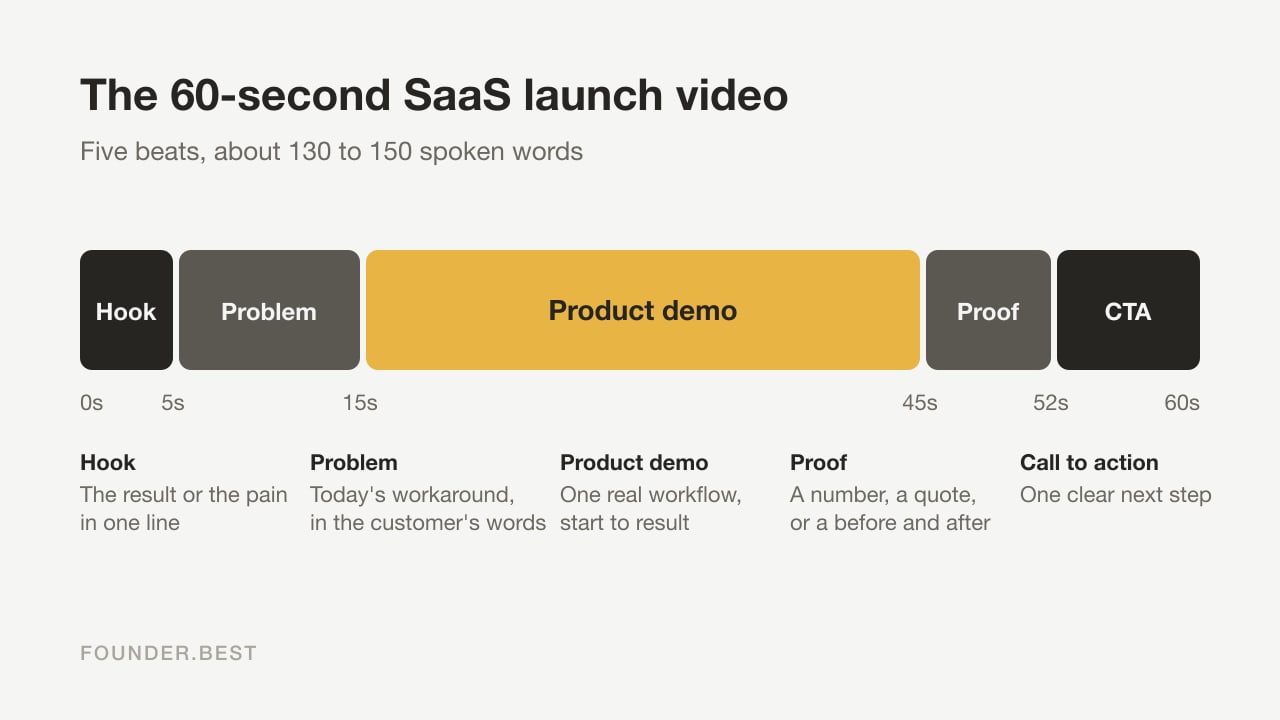
Use this structure:
- Hook (0 to 5 seconds): the result or the pain, in one line.
- Problem (5 to 15 seconds): what your customer deals with today, in their words.
- Product (15 to 45 seconds): one workflow, shown on screen, from start to result.
- Proof (45 to 52 seconds): a number, a customer quote, or a before and after.
- Call to action (52 to 60 seconds): one next step, such as "Start free" or "Try it on Founder.best".
 Copyable template
60-second SaaS launch video script
Hook: "Still [painful task] by hand? Here's how [Product] does it in [time]."
Problem: "If you're a [customer type], you know the drill. [Describe the workaround in one or two sentences.]"
Product: "With [Product], you [step one]. Then [step two]. And that's it: [result]."
Proof: "[Customer or number]: [short quote or result]."
Call to action: "Try [Product] free at [URL]."
Read the script out loud before you record. If you run out of breath or stumble on a line, rewrite it. Spoken sentences should be shorter than written ones.
How to make a SaaS launch video step by step
Here's the full process, in the order that saves the most time.
Step 1: Pick one workflow
Choose the single job your product does best, the one that made your first users say "oh, nice". Ignore everything else for now.
A demo that shows one complete workflow beats a demo that touches ten features.
Step 2: Write and time the script
Use the template above. Time yourself reading it at a relaxed pace. If it runs past 60 seconds, cut words, not clarity.
Step 3: Prepare a clean demo account
Create a fresh account with realistic sample data. Real-looking names and numbers make the product feel alive. Empty states make it feel unfinished.
Before you record, close other tabs, turn off notifications, hide your bookmarks bar, and zoom your browser in so text is readable on a phone.
Step 4: Record your screen in short takes
Record each step of the workflow as its own clip. Short takes are easier to redo and much easier to edit than one long recording.
Move your mouse slowly and deliberately. Pause for a beat after each click so the viewer can see what changed.
Step 5: Record the voiceover separately
Recording your voice while clicking through the app is hard. Record the voiceover on its own, reading your script, then match the screen clips to it.
A USB microphone in a quiet room with soft furnishings goes a long way. If you'd rather not use your own voice, AI voiceover tools can read the script for you.
Step 6: Edit for pace
Cut every pause, loading spinner, and wrong click. Add zooms on the part of the screen that matters, so viewers on small screens can follow.
Then add captions. Feeds on X and LinkedIn autoplay video without sound, so captions are how most people will follow your video there.
Step 7: Export a version for each platform
Export your launch demo in 16:9 for your website and launch pages. Then reframe the teaser to 9:16 for vertical platforms and 1:1 or 4:5 for social feeds.
Add a thumbnail or poster image with your product name and the main benefit. It's often the first thing people see.
The best tools to make a launch video in 2026
You don't need all of these. Pick one tool for each job you can't already do.
| Job | Tools to try | Good for |
|---|---|---|
| Screen recording | Screen Studio (Mac), Loom, OBS Studio (free) | Capturing your product with smooth cursor movement and zooms |
| Editing | Descript, CapCut, Canva | Cutting by transcript, adding captions, resizing for each platform |
| AI video generation | Higgsfield, Runway | Short opening shots, b-roll, and social teasers |
| AI voiceover | ElevenLabs | A clear narrated track from your script |
| AI presenter | HeyGen, Synthesia | An on-screen presenter if you don't want to be on camera |
| Interactive demos | Arcade, Supademo | Click-through demos for your landing page |
Features and pricing change often, so check each tool's current plans before you commit.
Where AI video tools help, and where they don't
AI video generators like Higgsfield are great for the bits around your product: a striking opening shot, a visual for the problem, or a short teaser for social media.
They shouldn't replace footage of your product. Viewers want to see the real interface, and anything that looks generated can make them doubt what they're buying. Use AI for the frame and a real screen recording for the picture.
Video formats and lengths by platform
Each channel has its own shape. Export once per format and you're covered.
| Where it goes | Format | Length | Notes |
|---|---|---|---|
| Your landing page | 16:9 | 60 to 90 seconds | Show a poster image and load the video when someone presses play, so the page stays fast |
| Founder.best launch page | 16:9 | 60 to 90 seconds | Paste a YouTube, Loom, or Vimeo link, or an .mp4 or .webm file, in the demo video field |
| Product Hunt | 16:9 | 60 to 90 seconds | Add a YouTube link to your launch gallery |
| YouTube | 16:9 | 2 to 3 minutes | Best home for the full walkthrough |
| YouTube Shorts, Reels, TikTok | 9:16 | 15 to 30 seconds | Shorts accept videos up to 3 minutes, but shorter teasers hold attention better |
| X | 16:9 or 1:1 | 15 to 30 seconds | Most accounts can upload up to 2 minutes and 20 seconds |
| 1:1 or 4:5 | 30 to 60 seconds | Autoplays muted, so captions do the heavy lifting |
Where to publish your SaaS launch video
Start with the places that keep working after launch day, then add the places that get attention on launch day.
- Your landing page, above the fold or right under the headline.
- Your Founder.best launch page, where the demo plays right on your product page and stays there after launch week.
- Your Product Hunt launch gallery.
- YouTube, with a clear title, a full description, and a link back to your site. It's searchable, and it gives you an embed link for everywhere else.
- Native uploads on X, LinkedIn, and vertical platforms. Upload the file directly instead of sharing a YouTube link.
- Your welcome email and onboarding checklist.
- Directory listings that accept a demo video.
Upload the same video once on YouTube and embed it everywhere. You'll keep one view count, and you can update the video in one place later.
Common launch video mistakes to avoid
Most weak demos fail for the same few reasons.
- Starting with your logo: a branded intro costs you the seconds when people decide to stay. Open with the hook.
- Showing every feature: viewers remember one workflow. Pick the best one.
- Talking about the product instead of the result: lead with what changes for the customer.
- Tiny, unreadable text: zoom in. Many people will watch on a phone.
- No captions: muted autoplay means a silent video with no captions says nothing.
- No call to action: tell people exactly what to do next.
- Fake footage: never use generated visuals that look like product features you don't have.
Your SaaS launch video checklist
Run through this before you publish.
- One workflow, shown from problem to result
- Script read out loud and timed under 90 seconds
- Clean demo account with realistic data
- Notifications off, browser zoomed in
- Voiceover clear, with no background noise
- Dead air and loading screens cut
- Zooms on every important click
- Captions added and checked for typos
- Clear call to action at the end
- 16:9, 9:16, and 1:1 versions exported
- Thumbnail with product name and main benefit
- Uploaded to YouTube and added to your launch pages
Go deeper on your launch
Your video is one piece of a launch. These guides cover the rest:
- The SaaS launch checklist covers everything to prepare before launch day, video included.
- Product Hunt launch strategies shows how to plan your gallery, first comment, and launch day.
- What to put on a SaaS landing page before you have customers shows where your demo fits on the page.
- Product page SEO helps your launch pages and videos get found in search.
- How to get your first 100 users turns launch attention into real users.
- Marketing tools for startups covers the rest of a lean marketing stack.
Ship the video this week
A SaaS launch video doesn't need to be perfect. It needs to be clear.
Pick one workflow. Write 60 seconds of script. Record it in short takes, add captions, and export it for each platform. That's a weekend, not a production.
When it's ready, add it to your Founder.best launch so the demo keeps working for you long after launch day.
Key takeaways
- A SaaS launch video shows one workflow from problem to result. It isn't a tour of every feature.
- Make three cuts from one recording: a 30-second teaser, a 60 to 90 second demo, and a 2 to 3 minute walkthrough.
- Script first. Hook, problem, product, proof, and call to action fit comfortably in 60 seconds.
- Record the screen and the voiceover separately. It's the easiest way to sound clear without a studio.
- Use AI video tools for openers, b-roll, and voiceovers, but always show your real product interface.
- Add captions, export 16:9, 9:16, and 1:1 versions, and add the demo to your Founder.best launch page so it keeps working after launch day.
Frequently asked questions
How long should a SaaS launch video be?
Aim for 60 to 90 seconds for your main launch demo. Cut a 30-second version for social feeds and keep a 2 to 3 minute walkthrough for people who are close to signing up. Shorter is fine if the workflow is simple.
Can I make a SaaS launch video without a video team?
Yes. A screen recorder, a decent microphone, a written script, and a simple editor with automatic captions are enough for most launches. AI tools can help with voiceovers and short opening clips.
Should I use AI to make my product demo video?
Use AI for the parts around your product: hooks, background clips, voiceovers, and captions. Record the product itself with a real screen recording so viewers see exactly what they'll get.
What should a SaaS launch video include?
A hook in the first few seconds, the problem in your customer's words, one real workflow in your product, a quick piece of proof such as a result or a quote, and one clear call to action.
Where should I post my SaaS launch video?
Put the main demo on your landing page and your launch pages, such as Founder.best and Product Hunt, then upload it to YouTube. Post the short teaser natively on X, LinkedIn, and vertical platforms like YouTube Shorts.
What aspect ratio should a launch video use?
Use 16:9 for your website, launch pages, and YouTube. Use 9:16 for YouTube Shorts, Reels, and TikTok. Use 1:1 or 4:5 for X and LinkedIn feeds.
Ready to launch on Founder.best?
Weekly rankings, dofollow SEO backlinks, founder stories, and a community built for indie makers.
Submit your startup
About the author
Anuj Shashimal
Founder, Founder.best
SaaS founder, indie hacker, and software engineer. Anuj built Founder.best to help indie founders launch, get discovered through search and AI answers, and turn launches into customers. He writes from first-hand experience growing Founder.best from zero to 400+ founders and 300+ launched products.
Keep reading
- The SaaS launch checklist every indie founder needs (2026)A SaaS launch checklist for indie founders: validation, launch assets, a 7 to 10 day launch week across the right platforms, and the first 30 days after.
- Product Hunt launch strategies: best practices for SaaS foundersProduct Hunt launch strategies for SaaS founders: pre-launch prep, launch-day execution, and the follow-through that turns one day of traffic into users.
- What to put on a SaaS landing page before you have customersNo users, logos, or testimonials yet? What to put on a SaaS landing page before launch: value proposition, demo, honest proof, pricing, CTA, and an FAQ.
- Product page SEO: the complete checklist for SaaS founders (2026)A 40-point product page SEO checklist for SaaS: keywords, on-page and technical SEO, feature and comparison pages, backlinks, and AI search visibility.
- How to get your first 100 users: a founder's launch playbookHow to get your first 100 users for a startup: founder outreach, communities, launch platforms, directories, SEO, and referrals, in the order that works.
- Marketing tools for startups (2026): honest picks from recent founder launchesMarketing tools for startups in 2026: the email, SEO, analytics, social, and launch tools indie founders actually use, and how to build a lean stack.
Weekly launch recap
One email with the week's winners, breakout launches, and what founders shipped.
Free tools and guides for this topic
Hand-picked from the tags on this post.
- Free startup launch checklist30+ tasks across pre-launch, launch day, and post-launch.
- Startup tagline generator12 tight one-liners for your landing page and launch post.
- Product slug checkerSee if your founder.best/products/ URL is still free.
- Free tools for foundersName generator, tagline writer, slug checker, DR checker, launch checklist.
- Launch SaaS guideHow to launch a SaaS product in 2026: validation, launch platforms, SaaS launch checklist, SEO backlinks,…
- Free SaaS directories for backlinksList of free SaaS and startup directories with dofollow filters, Ahrefs DR scores, and a submission checklist.