SEO for founders
What is SEO automation? A beginner's guide
SEO is full of repeat work: crawls, rank checks, broken links, report exports. SEO automation handles the boring parts on a schedule so you can focus on strategy, content, and fixes. This guide explains what it is, how it works, and how to start without falling for "rank on autopilot" hype.

Post by Anuj Shashimal
Founder, Founder.best11 min read
SEO looks glamorous in case studies. Day to day, it is a lot of the same checks.
Did that deploy break a canonical tag? Is the pricing page still indexed? Which blog posts lost clicks last month? Did someone ship a product update without refreshing the meta description?
That repetition is exactly why founders ask what is SEO automation in the first place. You are not trying to replace yourself. You are trying to stop living inside five tabs doing copy-paste reporting.
This beginner's guide covers the definition, how automated SEO workflows run, tasks you can hand off to software, tool categories, mistakes to skip, and a simple first project you can finish this week. If you want a deeper take on limits and startup stacks, read what SEO automation really does next.
What is SEO automation?
What is SEO automation? In plain language: using software, scripts, APIs, or AI-assisted steps to handle SEO tasks that follow clear rules, on a schedule or when a trigger fires.
Examples:
- A crawler that emails you when a money page returns a 404
- A rank tracker that snapshots 15 keywords every Monday
- A Zapier flow that posts Search Console clicks to Slack
- A script that flags product pages missing meta descriptions
Manual SEO means you log in, export, compare, and act every time. Automated SEO means the system collects data, applies rules, and nudges you when something needs attention.
Real-world picture: you launch a redesign. Overnight, a monitor notices /pricing redirecting to /home and pings you before paid traffic lands on the wrong page. That is SEO automation doing its job. Nobody's ranking jumped because of magic. You just caught a bug faster.
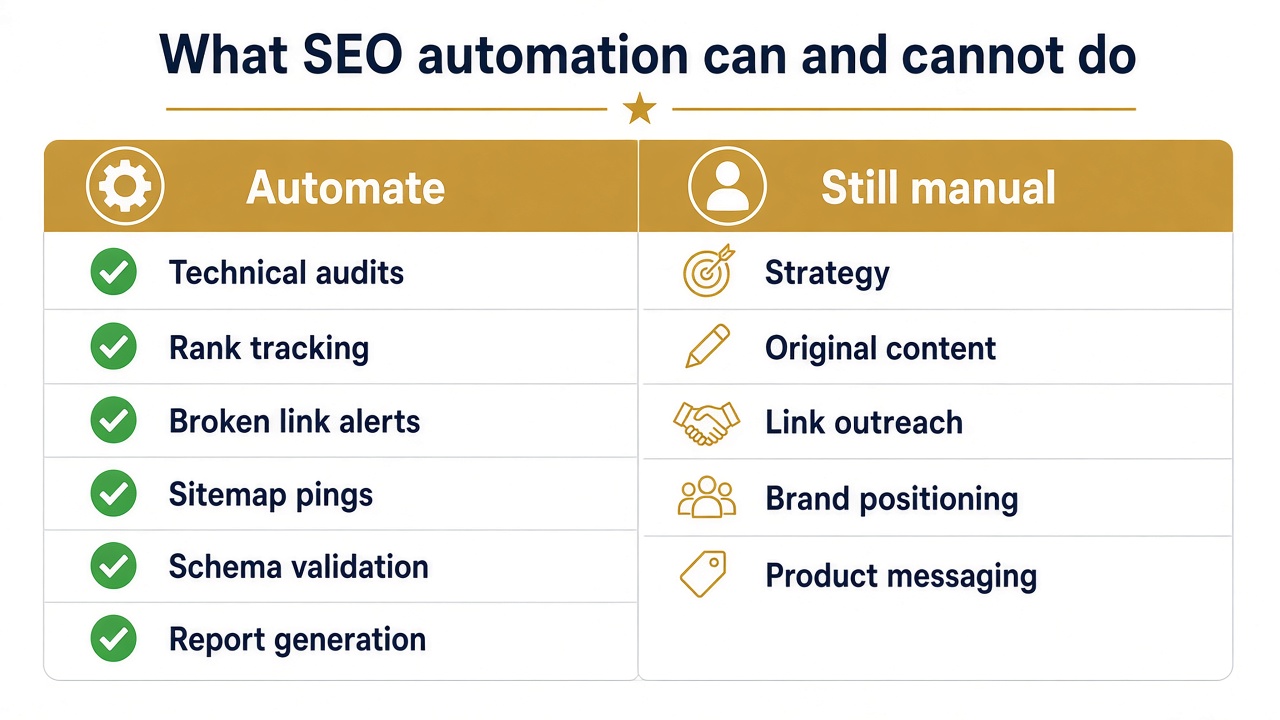 What SEO automation can and cannot do - monitoring vs human strategy
How does SEO automation work?
Most SEO automation workflows look the same under the hood, whether you use enterprise software or a free Zap.
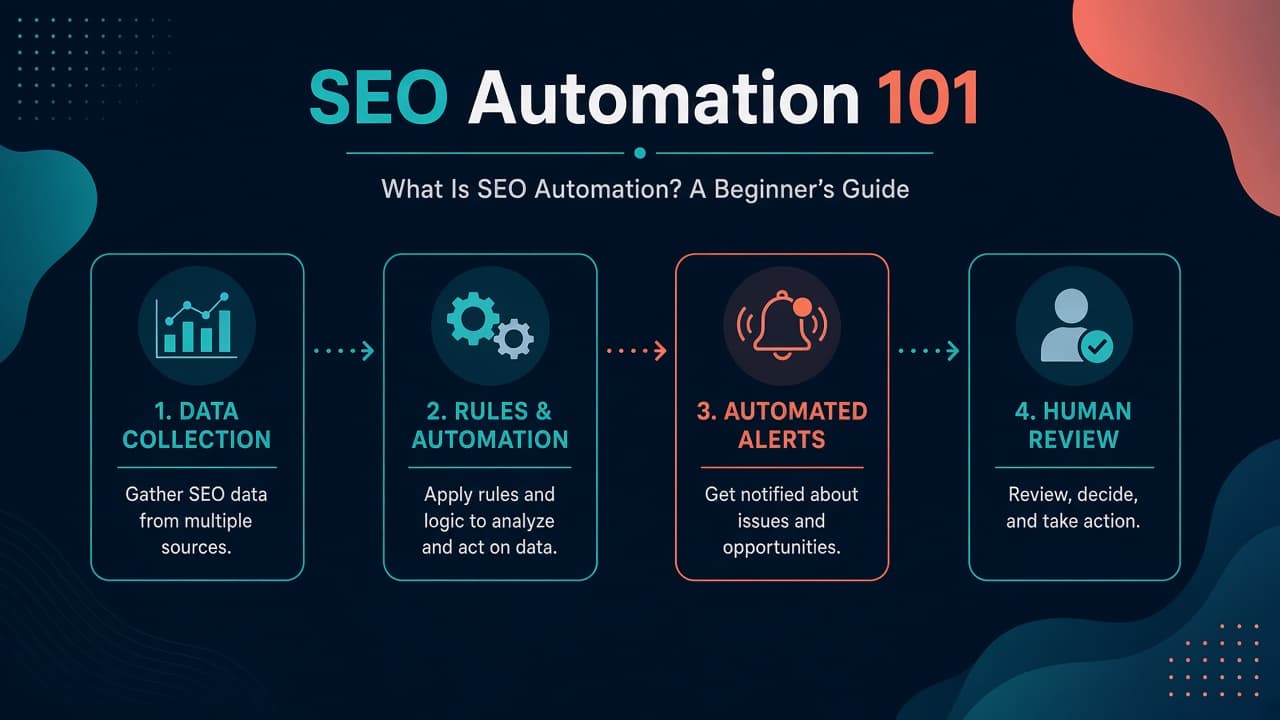
1. Data collection. Tools pull from your site (crawlers), Google (Search Console, Analytics), or third-party indexes (backlink and keyword APIs).
2. Rules and workflows. You define thresholds: "alert if organic sessions drop 30% week over week on /product," or "list URLs with title length over 60 characters."
3. Automated actions. The system sends alerts, updates a spreadsheet, opens a ticket, or generates a report. Some setups auto-fix low-risk items (for example pinging a sitemap after publish). Most founders should keep fixes human-approved at first.
4. Human review. Automation surfaces candidates. You decide what to change, what to ignore, and what needs a strategic call.
5. Performance monitoring. Track whether fixes correlate with impressions, clicks, and signups—not just whether the workflow ran.
Think of it as a smoke detector for organic search. It does not put out fires. It makes sure you notice smoke while the kitchen is still salvageable.
What SEO tasks can be automated?
Not everything should be. These tasks are common, well documented, and a good fit for beginners.
Keyword research and clustering. Tools group thousands of queries into topics. You still pick which clusters match your product and buyer intent.
Technical SEO audits. Scheduled crawls find broken links, redirect chains, duplicate titles, and indexation issues.
Keyword ranking tracking. Weekly position snapshots for a small keyword set—not hundreds of vanity terms.
Broken link detection. Especially after migrations, CMS changes, or documentation updates.
Meta title and meta description suggestions. AI or rule engines draft variants; you approve before publish.
Internal link recommendations. Crawlers flag orphan pages or suggest links between related articles in a topic cluster.
XML sitemap monitoring. Confirm the sitemap returns 200, includes new URLs, and stays under size limits.
Schema markup generation and validation. Generate JSON-LD from templates, then validate after each deploy.
Content briefs and update reminders. Trigger "refresh this post" when rankings slip or Search Console shows falling CTR.
Backlink monitoring. Alerts for new, lost, or toxic links—feeds outreach and disavow decisions, not auto-spam.
SEO reporting and traffic alerts. Weekly dashboards combining GA4, Search Console, and rank data.
If you run a startup on Founder.best, add one more item: listing parity checks. Your site tagline, URL, and category should match your permanent product page at founder.best/products/your-slug. Automation can diff those fields monthly; you fix mismatches that confuse Google and AI answer engines.
Benefits of SEO automation
Time. Reporting that took two hours becomes a 10-minute review.
Fewer manual errors. Copy-paste exports introduce typos; scheduled pulls do not.
Scale. Large sites and growing blogs need systematic checks; humans miss edge URLs.
Consistency. The same audit runs every week, not "when someone remembers."
Earlier problem detection. Traffic cliffs and index drops show up in alerts before quarterly reviews.
More room for high-value work. Strategy, interviews, product-led content, and launch storytelling—work that actually differentiates you.
Founders on our launch platform often automate monitoring first, then invest saved hours into founder-led SEO pages only they can write.
Best SEO automation tools (by job)
Organize tools by what you need done, not by logo popularity.
| Purpose | Tools | Free vs paid |
|---|---|---|
| Keyword research | Semrush, Ahrefs | Limited free trials; full data is paid |
| Technical crawl | Screaming Frog, Sitebulb | Screaming Frog free up to 500 URLs; paid for more |
| Search performance | Google Search Console | Free |
| Reporting | Looker Studio | Free (connectors may have limits) |
| Workflow glue | Make, Zapier | Free tiers with task caps; paid for volume |
| AI-assisted drafts | ChatGPT and similar | Free tiers; paid for higher limits |
Semrush and Ahrefs — keyword ideas, rank tracking, competitor snapshots, backlink alerts. Start with a short keyword list tied to revenue pages.
Screaming Frog and Sitebulb — crawl your site like Googlebot, export issues, schedule repeats. Pair with our post-launch SEO checks if traffic is flat after launch.
Google Search Console — ground truth for indexing, queries, and CTR. Turn on email alerts; pipe weekly data into Looker Studio.
Looker Studio — blend GA4 and Search Console into a dashboard your co-founder can read without tool logins.
Make and Zapier — connect alerts: "new Search Console coverage error → Slack channel."
AI writing tools — useful for briefs, meta variants, and summarizing crawl CSVs. Dangerous when connected straight to "publish post" without editing.
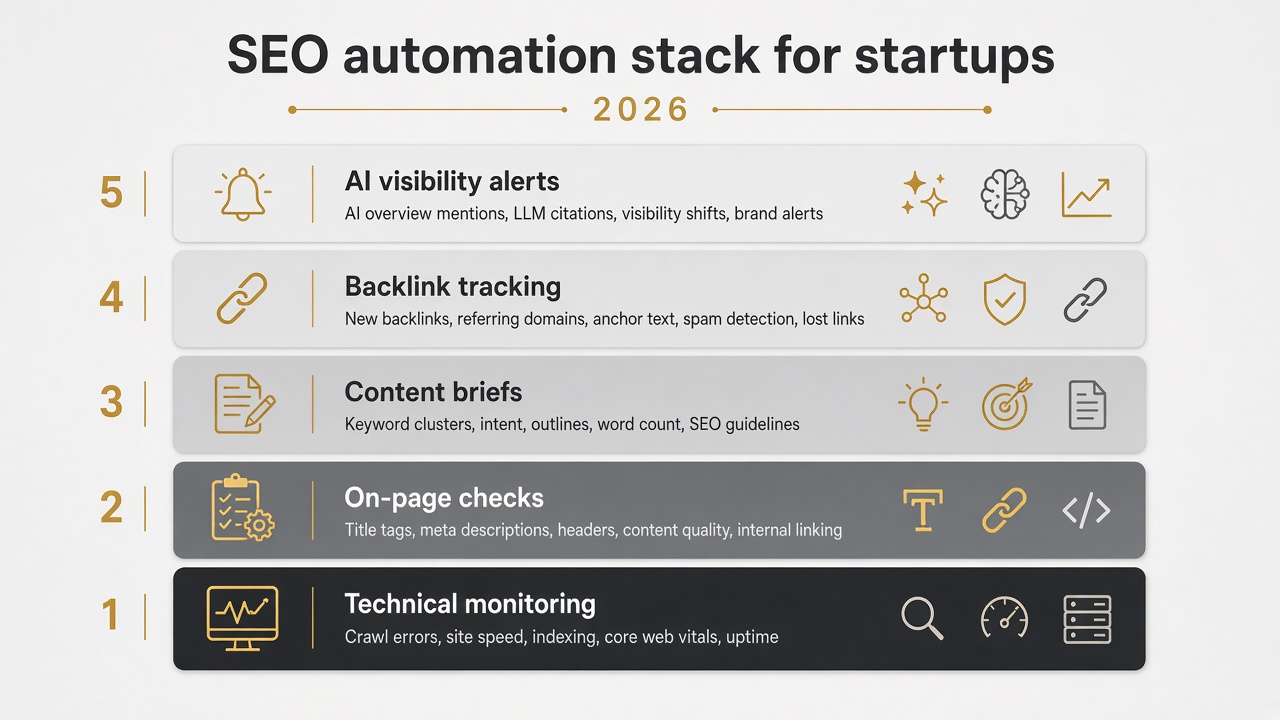 SEO automation stack for startups - monitoring, crawl, reporting, and alerts
Manual complements automation: Founder.best free tools like the slug checker before you submit a launch, and the domain rating checker for a monthly authority snapshot.
SEO automation vs AI SEO
Traditional SEO automation is mostly rule-based: if status code equals 404, send alert. If title missing, add row to spreadsheet.
AI SEO adds interpretation: cluster queries, draft outlines, suggest internal anchors, compare your copy to competitors.
| Rule-based automation | AI-assisted workflow | |
|---|---|---|
| Best for | Alerts, schedules, pass/fail checks | Summaries, drafts, clustering |
| Risk | Low if thresholds are sane | Higher if you auto-publish |
| Human role | Review alerts | Review every draft and fact |
Use rules for monitoring and measurement. Use AI inside the workflow for speed on research and first drafts. Keep publish buttons human—especially for YMYL topics or pricing claims.
For how AI discovery fits alongside classic SEO, see AI search visibility for SaaS.
Can SEO be fully automated?
No—and anyone selling full autopilot is oversimplifying.
Safe to automate: crawls, rank snapshots, sitemap pings, schema validation, report generation, reminder emails for content refreshes.
Needs humans: choosing which keywords match your wedge, writing with original proof, outreach for editorial links, deciding to merge or noindex pages, interpreting why a competitor outranked you.
Keyword selection still requires judgment. Volume is one input. Intent, buyer stage, and business value matter more for startups.
Content needs fact-checking, originality, and editing. AI can draft; it cannot replace screenshots from your product, customer quotes, or pricing you stand behind.
Automation cannot guarantee rankings. Google rewards useful pages backed by trust signals—not workflow volume.
How to automate SEO: step-by-step
-
List repetitive SEO tasks. Export reports, check broken links, compile weekly numbers—circle what happens every week.
-
Choose one task first. Missing meta descriptions or post-deploy 404 checks are good starters.
-
Connect data sources. Search Console, GA4, your crawler, or a rank tracker API.
-
Set rules, triggers, and schedules. Weekly crawl Sunday night; alert within an hour if
/pricingis not 200. -
Review output for errors. False positives happen. Tune thresholds before you widen scope.
-
Track time saved and SEO performance. Hours saved per month plus impressions and signups on fixed URLs.
-
Improve, then automate the next task. Do not wire 12 Zaps before you trust the first one.
When you launch on Founder.best, add your listing URL to the same monitor group as / and /product. Paid tiers include a dofollow backlink and an indexable page—useful corroboration for product page SEO and for AI systems verifying your entity.
SEO automation examples
- Traffic alert: email when top three landing pages lose more than 25% sessions week over week.
- Weekly report: Looker Studio PDF to your inbox every Monday with clicks, impressions, and top queries.
- Missing meta: monthly crawl export filtered to URLs with empty description tags.
- Broken links after deploy: nightly crawl of docs and blog; Slack message if any internal 404 appears.
- Content refresh list: Search Console query export where position is 8–15 and CTR fell—candidate update posts.
- Technical issue ping: Core Web Vitals field data regression after a frontend release triggers a GitHub issue.
Common SEO automation mistakes
Publishing AI articles with no review. You inherit factual errors and duplicate angles.
Targeting keywords without search intent. Automation scales the wrong pages faster.
Automating too much before testing. One reliable alert beats twelve flaky ones.
Ignoring errors in reports. Dashboards become wallpaper.
Building low-value pages at scale. Programmatic sprawl without unique data creates cleanup work.
Failing to measure results. If signups do not move after fixes, revisit strategy—not just cron schedules.
Monitoring only your domain. Check that your Founder.best listing still matches your live site after rebrands.
Programmatic SEO vs SEO automation
People often lump these together because both involve software.
Programmatic SEO builds many similar pages from a template plus data—think thousands of integration or location pages. SEO automation keeps the pages you already have healthy: crawls, alerts, reports, meta checks.
You might use both on a mature site. As a beginner, prioritize automation that catches breakage and saves reporting time before you scale templated content.
Where to go from here
What is SEO automation in one sentence: scheduled software that handles repeat SEO operations so you can focus on decisions that need a founder's brain.
Start small—Search Console alerts plus one weekly check on your product page and your Founder.best listing. Fix what breaks. Write one page this month that only you could write.
When you want the honest limits and a lean stack diagram, continue with what SEO automation really does. When you are ready for distribution that feeds long-term SEO, submit your product and get a permanent page the same monitors can watch alongside your own site.
Subscribe to the Founder.best newsletter for weekly launches and SEO-minded founder stories—you will see real examples of what gets indexed, linked, and cited after launch week ends.
Key takeaways
- SEO automation runs repeatable tasks—monitoring, audits, tracking, and reports—not strategic decisions or publish-ready content.
- Most beginner stacks start free: Google Search Console, GA4, and one crawl or rank tool before paying for Semrush or Ahrefs.
- Rule-based workflows are reliable for alerts; AI helps with briefs and summaries but still needs human review before anything goes live.
- Automate detection first (404s, missing meta, traffic drops), then fix issues manually and measure whether organic signups improve.
- Add your Founder.best product URL to the same monitoring list as your homepage and pricing page so taglines and links stay consistent everywhere.
Frequently asked questions
What is SEO automation in simple terms?
SEO automation is when software or scheduled workflows do repetitive SEO work for you—like checking for broken links, tracking keyword positions, crawling for technical errors, or emailing a weekly performance report. You set the rules once; the system runs them on a timer or when something changes. It does not mean Google ranks you automatically.
Is SEO automation worth it for small businesses?
Yes, in a small form. A solo founder or tiny team cannot manually re-check every page every week. Free tools like Search Console plus one automated crawl or alert catch problems early. Full enterprise suites are usually overkill until you manage large sites or multiple domains.
What are the best SEO automation tools?
It depends on the job. Semrush and Ahrefs excel at keyword research and rank tracking. Screaming Frog and Sitebulb handle technical crawls. Google Search Console is essential and free for search performance. Looker Studio builds reports. Make and Zapier connect alerts. AI tools help draft briefs but should not auto-publish without review.
Can AI automate SEO?
AI can automate parts of SEO—clustering keywords, drafting meta descriptions, summarizing crawl exports, suggesting internal links. It is weak at picking strategy, verifying facts, and earning trust. Treat AI as a helper inside your workflow, not the final editor.
Is SEO automation free?
Many building blocks are free: Google Search Console, GA4, PageSpeed Insights, and basic Looker Studio dashboards. Crawlers and rank trackers often have limited free tiers; deep keyword databases usually need a paid plan. You can automate meaningful monitoring without a big budget.
How do you automate SEO for a website?
List repetitive tasks, pick one (for example missing meta descriptions), connect the data source, set a trigger or schedule, route alerts to email or Slack, review results weekly, and track time saved plus organic performance before adding more automation.
Does SEO automation improve Google rankings?
Not directly. Automation helps you find and fix issues faster, stay consistent, and spend more time on content and links. Better rankings come from matching search intent, quality pages, and authority—not from running a script alone.
What is the difference between SEO automation and programmatic SEO?
SEO automation runs operational tasks on existing pages—monitoring, audits, reports. Programmatic SEO usually means generating many pages from a template and data feed (for example location or integration pages). Both use software; programmatic SEO is a content strategy, while SEO automation is mostly workflow and maintenance.

About the author
Anuj Shashimal
Founder, Founder.best
SaaS founder, indie hacker, and software engineer. Anuj built Founder.best to help indie founders launch, get discovered through search and AI answers, and turn launches into customers. He writes from first-hand experience growing Founder.best from zero to 400+ founders and 300+ launched products.
Tagged in
Browse all tagsKeep reading
Free tools and guides for this topic
Hand-picked from the tags on this post.
- Free Ahrefs Domain Rating checkerLive DR (0–100) for any domain before you chase a backlink.
- Free tools for foundersName generator, tagline writer, slug checker, DR checker, launch checklist.
- Get your product discovered by AI assistantsWhich listing fields make your product rank for the right questions.
- Free SaaS directories for backlinksList of free SaaS and startup directories with dofollow filters, Ahrefs DR scores, and a submission checklist.
- Free founder toolsFree tools for startup founders in 2026: launch checklist, name generator, tagline writer, slug checker, and…
- Startup launch statistics & researchOriginal launch data plus sourced figures on AI search and startup failure.
Ready to launch on Founder.best?
Weekly rankings, dofollow SEO backlinks, founder stories, and a community built for indie makers.
Submit your startup